Powered by Ada.im - AI Data Analysis Platform

AI Chart Generator即時創建精美圖表

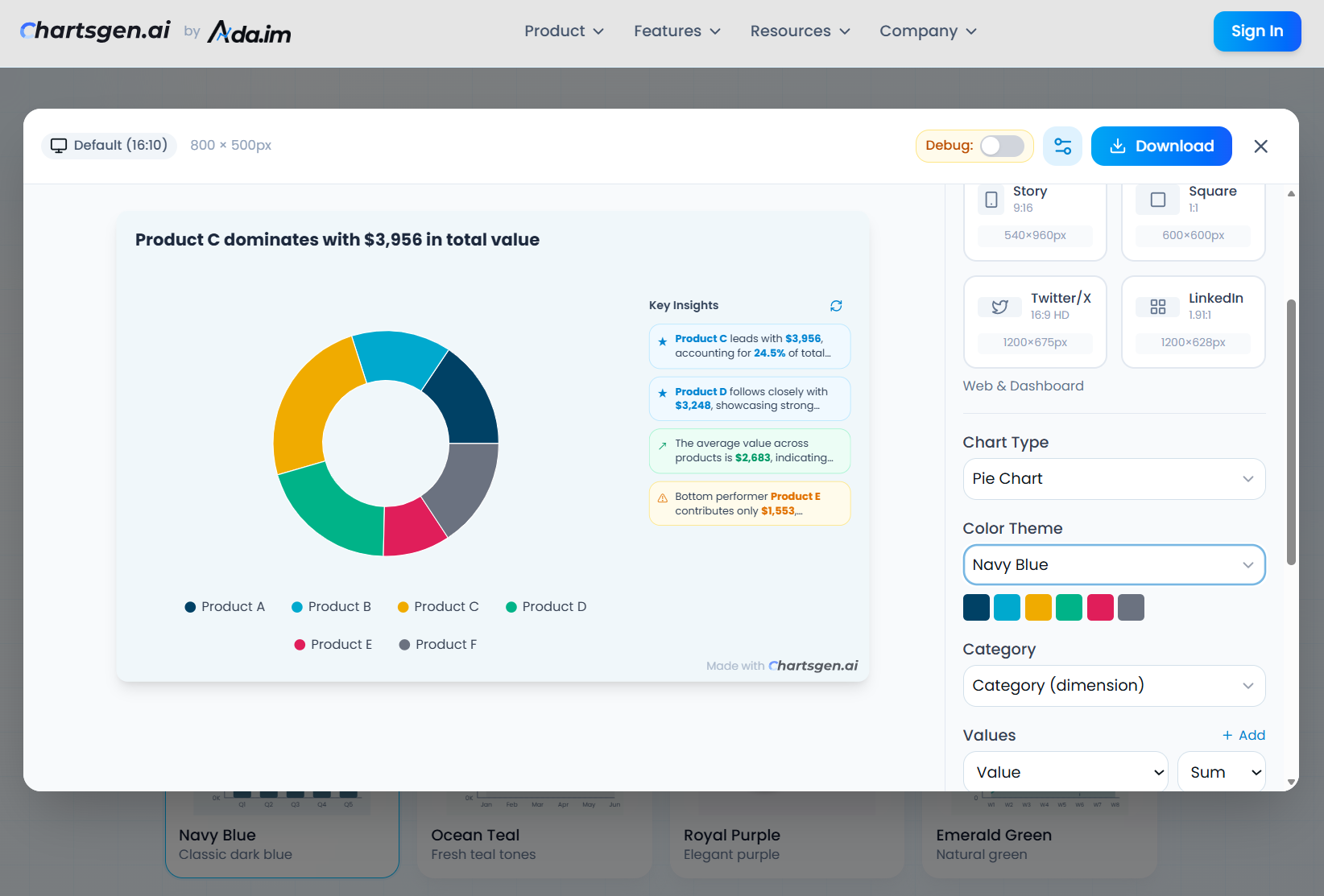
Turn your data into stunning, professional visualizations with the power of artificial intelligence. Upload your CSV or Excel file, describe what you want to visualize in plain English, and watch as ChartGen creates the perfect bar chart, line graph, pie chart, or any visualization in seconds. No design skills required.

Create Charts in 3 Simple Steps

Upload your data, describe what you want to visualize, and let AI generate professional McKinsey-style charts with insights in seconds.

ChartGen AI demo
esc
F1
F2
F3
F4
F5
F6
F7
F8
F9
F10
F11
F12
~
1
2
3
4
5
6
7
8
9
0
-
=
del
tab
Q
W
E
R
T
Y
U
I
O
P
[
]
\
caps
A
S
D
F
G
H
J
K
L
;
'
return
shift
Z
X
C
V
B
N
M
,
.
/
shift
fn
ctrl
opt
cmd
cmd
opt

9 Professional Chart Types for Data Visualization

From simple bar charts and line graphs to complex heatmaps and combo charts, our AI-powered chart generator handles all your data visualization needs with professional quality output.

Bar Chart

Perfect for comparing quantities across categories. Create vertical, horizontal, stacked, or grouped bar charts for sales analysis, survey results, and categorical data comparison.

Line Chart

Ideal for showing trends over time. Visualize time series data, track performance metrics, and analyze stock prices, temperature changes, or website traffic patterns.

Pie Chart

Best for showing proportions and percentages. Display market share distribution, budget allocation, survey response breakdown, and composition analysis.

Area Chart

Shows cumulative totals and volume over time. Perfect for visualizing stacked data, revenue streams, population growth, and cumulative metrics.

Scatter Plot

Great for visualizing correlations between variables. Analyze relationships in scientific data, identify outliers, and explore patterns in bivariate datasets.

Heatmap

Excellent for matrix data and intensity patterns. Display correlation matrices, geographic density, user behavior analysis, and time-based activity patterns.

Combo Chart

Combines bar and line for multi-metric analysis. Compare related metrics on different scales, like revenue vs. profit margin or sales volume vs. growth rate.

Waterfall Chart

Perfect for showing incremental value changes. Visualize profit and loss statements, budget variance, inventory changes, and sequential data flows.

Funnel Chart

Ideal for conversion and process visualization. Track sales funnels, marketing campaigns, user onboarding flows, and pipeline analysis.

Powerful AI Chart Generation Capabilities

ChartGen combines intuitive design with advanced artificial intelligence to make data visualization effortless. Create professional charts without any design or coding skills.

Smart Data Import

Upload CSV or Excel files with automatic column detection. Our AI identifies data types, dates, numbers, currencies, and text fields instantly for seamless data visualization.

Natural Language Input

Describe your chart in plain English. Say 'show me monthly sales by region' or 'create a pie chart of market share' - no coding or technical syntax required.

AI-Powered Generation

Advanced artificial intelligence analyzes your data structure, identifies patterns, and creates the perfect visualization with optimal chart type selection in seconds.

Professional Color Themes

Choose from 12 professionally designed color palettes including Ocean Blue, Forest Green, Corporate Gray, and more. Ensure brand consistency and visual appeal.

Flexible Data Configuration

Fine-tune your charts with aggregation methods (sum, average, count, min, max), sorting options, data limits, axis labels, and display customization.

輕鬆匯出和分享

下載高品質PNG圖片用於簡報、報告和社交媒體

Unlock Full Data Analysis Potential

Want More? Explore Ada.im Data Analysis Platform

ChartGen is just the beginning. Register on Ada.im to unlock the complete AI data analysis platform with advanced features for professionals and teams including dashboards, automated reports, and enterprise security.

Advanced Data Connectors

Connect directly to MySQL, PostgreSQL, BigQuery, Google Sheets, REST APIs, and 50+ data sources. Real-time data synchronization for live dashboards.

Team Collaboration

Share charts and dashboards with your team. Real-time collaboration, comments, version history, and granular permission controls.

Interactive Dashboards

Create multi-chart dashboards with filters, drill-downs, cross-filtering, and interactive elements. Embed dashboards in your applications.

Enterprise Security

SOC 2 Type II compliant with SSO integration, role-based access control, audit logs, data encryption, and dedicated support.

Automated Reports

Schedule automated report generation with custom templates. Deliver insights to stakeholders via email, Slack, or webhook.

Real-time Updates

Charts automatically refresh when your data sources update. Set custom refresh intervals from real-time to daily.

Free tier available. No credit card required.

Loved by Data Professionals Worldwide

See what marketing managers, financial analysts, and data teams say about ChartGen's AI chart generator

"作為數據視覺化新手,ChartGen是救星!不需要掌握複雜工具。"

Coco X.

數據分析師, 科技新創公司

"當你不是設計師時,自動圖表類型選擇非常方便。"

Wei H.

投資銀行, 金融服務

"這正是我們行銷團隊需要的。AI洞察功能是黃金!"

Yayako Y.

品牌故事家, 數位行銷公司

"一鍵跳過手動圖表工作 - 夢想成真!對雜亂數據集也很有效。"

Pravin M.

學生和開發者, 大學

"用CRM的大型CSV匯出測試了ChartGen。它完美地處理了數據。"

Quinn H.

銷售營運, SaaS公司

"這就是新創公司分析視覺化應該有的樣子!不需要專門的設計師。"

Brenda Z.

數據故事家, 早期新創公司

"開發者的好工具!作為行動開發者,測試時總是處理CSV。"

Rabinder H.

行動開發者, App開發工作室

"不需技術就能製作財務圖表,完美!"

Richard F.

共同創辦人, 金融科技新創

"第一天用戶,已經能看到這將改變遊戲規則。"

Yuzhu P.

產品經理, 電商平台

"AI真的理解我的要求。非常令人印象深刻。"

A. Ho

行銷經理, 零售品牌

"測試了幾天。數據解讀驚人地準確。"

Christine L.

業務分析師, 顧問公司

"一鍵生成圖表聽起來簡單,但實際上是革命性的。"

Charles W.

內容創作者, 媒體公司

"作為數據視覺化新手,ChartGen是救星!不需要掌握複雜工具。"

Coco X.

數據分析師, 科技新創公司

"當你不是設計師時,自動圖表類型選擇非常方便。"

Wei H.

投資銀行, 金融服務

"這正是我們行銷團隊需要的。AI洞察功能是黃金!"

Yayako Y.

品牌故事家, 數位行銷公司

"一鍵跳過手動圖表工作 - 夢想成真!對雜亂數據集也很有效。"

Pravin M.

學生和開發者, 大學

"用CRM的大型CSV匯出測試了ChartGen。它完美地處理了數據。"

Quinn H.

銷售營運, SaaS公司

"這就是新創公司分析視覺化應該有的樣子!不需要專門的設計師。"

Brenda Z.

數據故事家, 早期新創公司

"開發者的好工具!作為行動開發者,測試時總是處理CSV。"

Rabinder H.

行動開發者, App開發工作室

"不需技術就能製作財務圖表,完美!"

Richard F.

共同創辦人, 金融科技新創

"第一天用戶,已經能看到這將改變遊戲規則。"

Yuzhu P.

產品經理, 電商平台

"AI真的理解我的要求。非常令人印象深刻。"

A. Ho

行銷經理, 零售品牌

"測試了幾天。數據解讀驚人地準確。"

Christine L.

業務分析師, 顧問公司

"一鍵生成圖表聽起來簡單,但實際上是革命性的。"

Charles W.

內容創作者, 媒體公司

Frequently Asked Questions About AI Chart Generator

Everything you need to know about ChartGen's AI chart generation, data visualization features, and integration with Ada.im

ChartGen's AI Chart Generator is an intelligent data visualization tool that uses artificial intelligence to transform your raw data into beautiful, professional charts automatically. Simply upload your CSV or Excel file, describe what you want to visualize in plain English, and our AI will analyze your data, select the appropriate chart type, and generate a stunning visualization in seconds.

Our AI analyzes multiple factors: your natural language description, the structure and types of your data columns, and the relationships between variables. It then selects the most appropriate chart type, determines which fields to use for categories and values, applies suitable aggregation methods (sum, average, count, etc.), and even generates meaningful insights about your data.

ChartGen supports 9 professional chart types: Bar Charts (vertical, horizontal, stacked, grouped), Line Charts, Pie Charts, Area Charts, Scatter Plots, Heatmaps, Combo Charts (bar + line), Waterfall Charts, and Funnel Charts. The AI automatically recommends the best chart type for your data, but you can also specify your preference.

AI圖表生成器接受CSV檔案和Excel試算表。您也可以貼上數據或用自然語言描述。

可以!AI生成圖表後,您可以自訂顏色、標籤、圖例、標題等。

是的!ChartGen提供免費AI圖表生成。您可以從免費方案開始,根據需要升級。

ChartGen is the dedicated chart generation product built by Ada.im, a comprehensive AI data analysis platform. While ChartGen focuses specifically on quick, AI-powered chart creation, Ada.im offers the complete data analysis suite including reports, dashboards, presentations, data connectors, team collaboration, and enterprise features. Think of ChartGen as the chart-focused entry point to Ada.im's powerful capabilities.

To unlock all features including unlimited chart generation, advanced export options (SVG, PDF, embed codes), database connections, real-time data sync, team collaboration, and automated reporting, simply register for a free account at ada.im. You'll get immediate access to the full Ada.im platform with ChartGen's chart generation built-in.

Absolutely. Your data security is our top priority. Files uploaded to ChartGen are processed in real-time and not permanently stored. All data transmission uses HTTPS encryption. Ada.im is SOC 2 Type II compliant, ensuring enterprise-grade security. We never share, sell, or use your data for training purposes.

Beyond generating charts, our AI analyzes your aggregated data to provide meaningful insights. These include identifying top and bottom performers, highlighting significant trends, calculating key statistics (totals, averages, distributions), spotting outliers, and suggesting actionable observations. Insights are automatically refreshed when you modify chart configurations.

Ready to Create Beautiful Data Visualizations?

Start using ChartGen's free AI chart generator today. Transform your CSV and Excel data into professional bar charts, line graphs, pie charts, and more in seconds. Or unlock advanced data analysis with Ada.im.

基本功能永久免費·無需信用卡·隨時升級