

返回使用案例 使用範本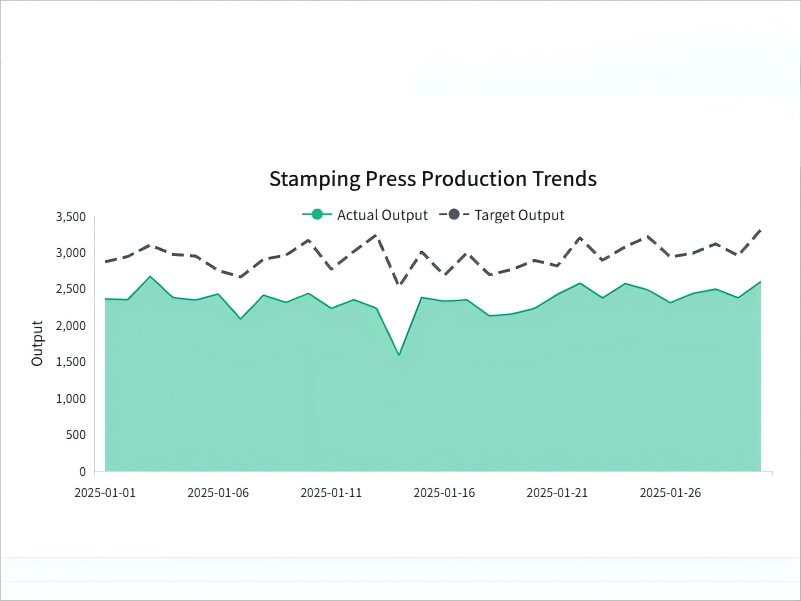
CREATE_CHART
Stamping Fleet Production Adherence
Description
Monitor daily actual output versus operational targets to visualize performance gaps and guide resource allocation decisions.
Input Settings
Action: chartDeep Think: falseWeb Search: Disable
Recommended Prompt
Create a Single Area Chart in English for 'Stamping_Press' production trends. Data Logic: Source: Join fact_production_hourly with dim_machines. Filter: ModelType = 'Stamping_Press'. Aggregate: Sum ActualOutput and TargetOutput by Date. Visual Styling: Series 1 (Target): TargetOutput as a Bold Dashed Line (Dark Grey). Series 2 (Actual): ActualOutput as a Filled Area (Emerald Green, 50% opacity). Layering: Target Line on top of Actual Area. Specific Fixes (CRITICAL): Legend Layout: Ensure the legend icons match the series style exactly. The icon for 'Target Output' must be a pure dashed line segment. Do NOT overlay any circular markers or dots on the legend line. The icon for 'Actual Output' must be a solid color block or a clean line. X-Axis: Maintain the previous fix: Display a date label ONLY every 5 days to ensure zero overlap. Remove the axis title 'Date'. Goal: A clean chart where the legend clearly shows a dashed line vs. a filled area without obstructing markers.
Sample Datasets
dim_machines.csv
815 B
dim_products.csv
243 B
fact_defects.csv
176.45 KB
fact_energy.csv
255.79 KB
fact_production_hourly.csv
430.86 KB