



20 tools. Two weeks. Three fatal flaws.
I live inside presentations: investor decks, product demos, client reports, and internal reviews. When AI presentation makers exploded, I was the obvious customer. I wanted the promise to be real: type a prompt, get a polished deck, and move on.
So I tested 20 AI presentation generators over two weeks, including Gamma, Tome, SlidesAI, Beautiful.ai, Slidesgo, Canva AI, Pitch, Decktopus, Presentations.AI, and a dozen smaller tools. I gave each product the same prompts and judged the results on data accuracy, content depth, editability, design quality, and export reliability.
The verdict was consistent. Most tools are impressive for the first 30 seconds. The deck appears quickly. The template looks clean. The demo feels magical. Then real work starts and the cracks show.
The Market Is Real, But the Product Category Is Splitting
AI presentation software is already a large market. HTF Market Intelligence estimated the category at $1.5 billion in 2025, with projections reaching $4.0 billion by 2033. Gamma reportedly reached 70 million users and a $2.1 billion valuation.
That momentum matters. But scale does not automatically mean the workflow is solved. Tome also reached a large user base before shutting down its presentation product. The core problem is not demand. The problem is whether these tools can support the kind of presentation work professionals actually do.
After testing the category, I kept seeing the same three flaws.
Flaw 1: The Hallucination Problem
When the AI puts "47% growth" on your slide, can you trace where that number came from?

You ask an AI tool to create a market analysis presentation for the EV industry. It returns beautiful slides with charts, percentages, market sizing, and confident claims. The deck looks credible. The numbers may be fabricated.
This is not a theoretical concern. ChartAttack research showed that multimodal LLMs can create misleading charts with significant accuracy drops. Separate chart captioning studies found that advanced models frequently produce factually inaccurate descriptions of charts.
For business presentations, that is catastrophic. A hallucinated statistic in front of investors, executives, or clients can destroy trust in a single slide.
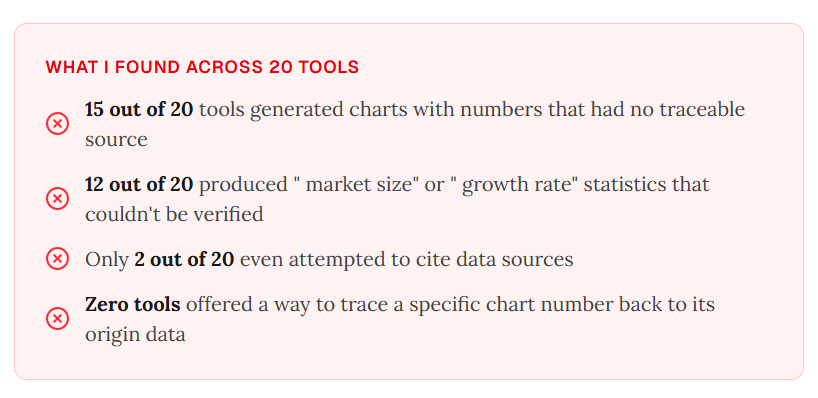
A strong consulting deck works because every number has a source. An AI-generated deck fails when no number has one. Business presentations are not creative writing. If the data is not traceable, the presentation is not trustworthy.
Flaw 2: The Beautiful Prison
AI generated the slide in 10 seconds. Then I spent 30 minutes trying to move a text box.

Many AI slide generators produce static images or image-based PPT files. Even when a tool promises editable output, "editable" often means you can change the words but cannot freely move objects, resize charts, adjust layouts, or break out of the template grid.
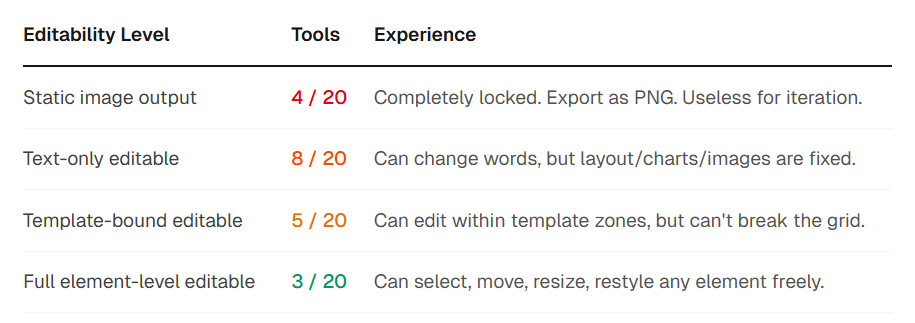
That defeats the point. Presentation work is iterative. You generate a first version, then tune spacing, reorder ideas, resize visuals, and adjust the message for the audience. If the AI output is a take-it-or-leave-it package, it is a demo, not a tool.
Products like v0 got this right in the coding world: generate first, then let users edit every element with full control. Presentation tools need the same principle.
Flaw 3: The Content Depth Illusion
It looks like a consulting deck. It reads like a generic summary.
Most AI PPT tools follow a simple pipeline: prompt goes in, an LLM writes text, text gets placed into a template, and the deck is done. The result is often plausible but shallow.
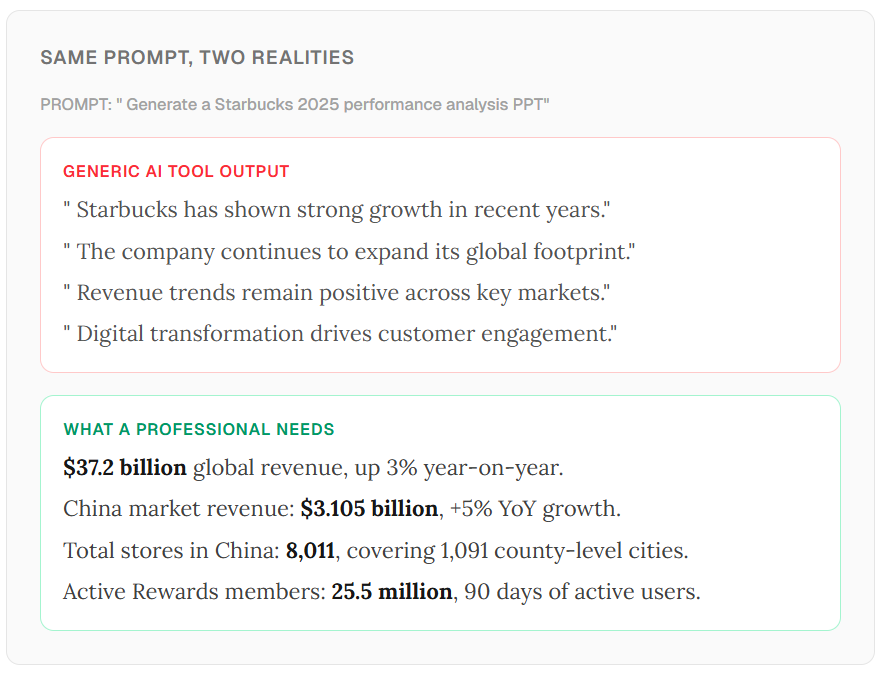
Ask for a Starbucks 2025 performance analysis and a generic tool may produce lines like:
- Starbucks has shown strong growth in recent years.
- The company continues to expand its global footprint.
- Revenue trends remain positive across key markets.
- Digital transformation drives customer engagement.
What a professional actually needs is specific:
- $37.2 billion global revenue, up 3% year-on-year.
- China market revenue of $3.105 billion, up 5% year-on-year.
- 8,011 stores in China across 1,091 county-level cities.
- 25.5 million active Rewards members over a 90-day period.
The difference is not writing style. It is infrastructure. The first output is plausible language. The second requires retrieval, analysis, synthesis, and verification. A single LLM call cannot research, analyze, structure, and design a serious business deck at the same time.
The Aha Moment
At ChartGen AI, we had already built the pieces: data visualization, chart generation, Gantt diagrams, an infinite data canvas, a traceability layer, element-level editing, and a multi-agent pipeline.
So when users asked whether ChartGen could generate a full presentation from their data, the answer was not to build a traditional PPT tool from scratch. It was to connect what already worked.
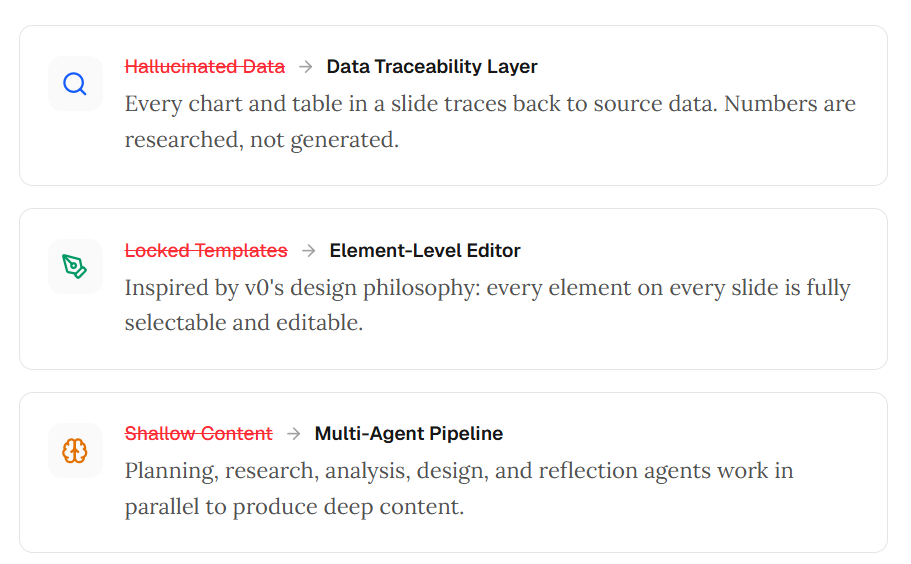
The product direction became clear:
- Data traceability layer: every chart and table traces back to source data.
- Element-level editor: every slide element is selectable and editable.
- Multi-agent pipeline: planning, research, analysis, design, and reflection work together.
We did not set out to build another slide generator. We set out to fix the three problems that made existing AI PPT tools frustrating for professionals who care about the data in their slides.
How It Works: From Prompt to Presentation
The workflow starts with a natural language prompt. No template browsing. No upfront slide structure. Just describe what you need:
- "Help me generate a PPT of Starbucks 2025 performance analysis."
- "Help me generate a McKinsey-level PPT on the latest LVM model Seedance 2.0."
- "Help me generate a detailed product info PPT for ChartGen AI."
Step 1: The Multi-Agent Pipeline Kicks In

Unlike single-shot LLM tools, ChartGen AI orchestrates specialized agents across the deck creation process.
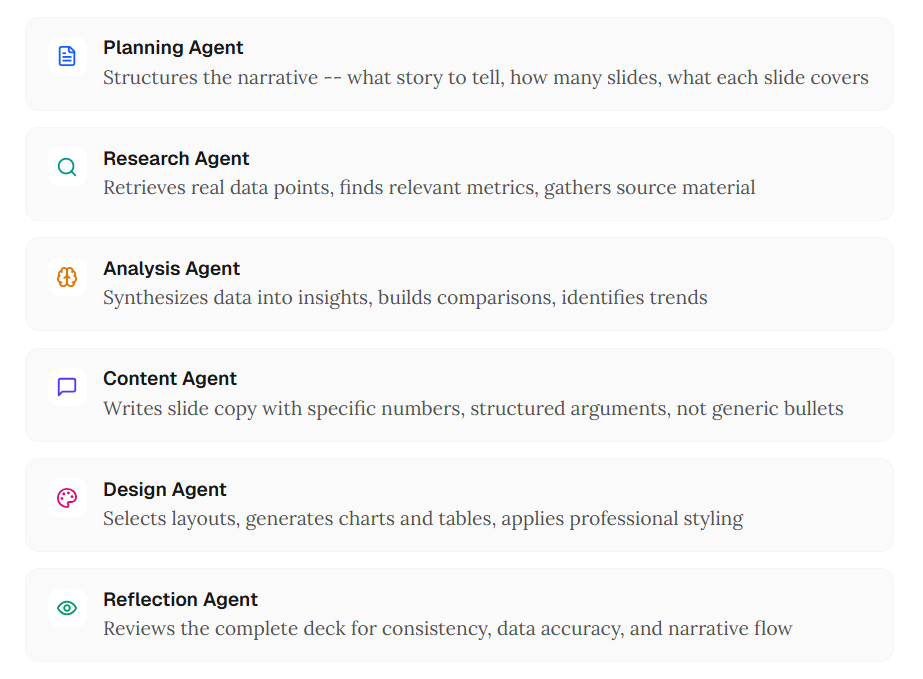
- Planning agent: structures the narrative and slide flow.
- Research agent: retrieves real data points and source material.
- Analysis agent: synthesizes data into comparisons and trends.
- Content agent: writes specific slide copy instead of generic bullets.
- Design agent: selects layouts, charts, tables, and styling.
- Reflection agent: reviews consistency, accuracy, and narrative flow.
The result is content with depth, specificity, and traceability.
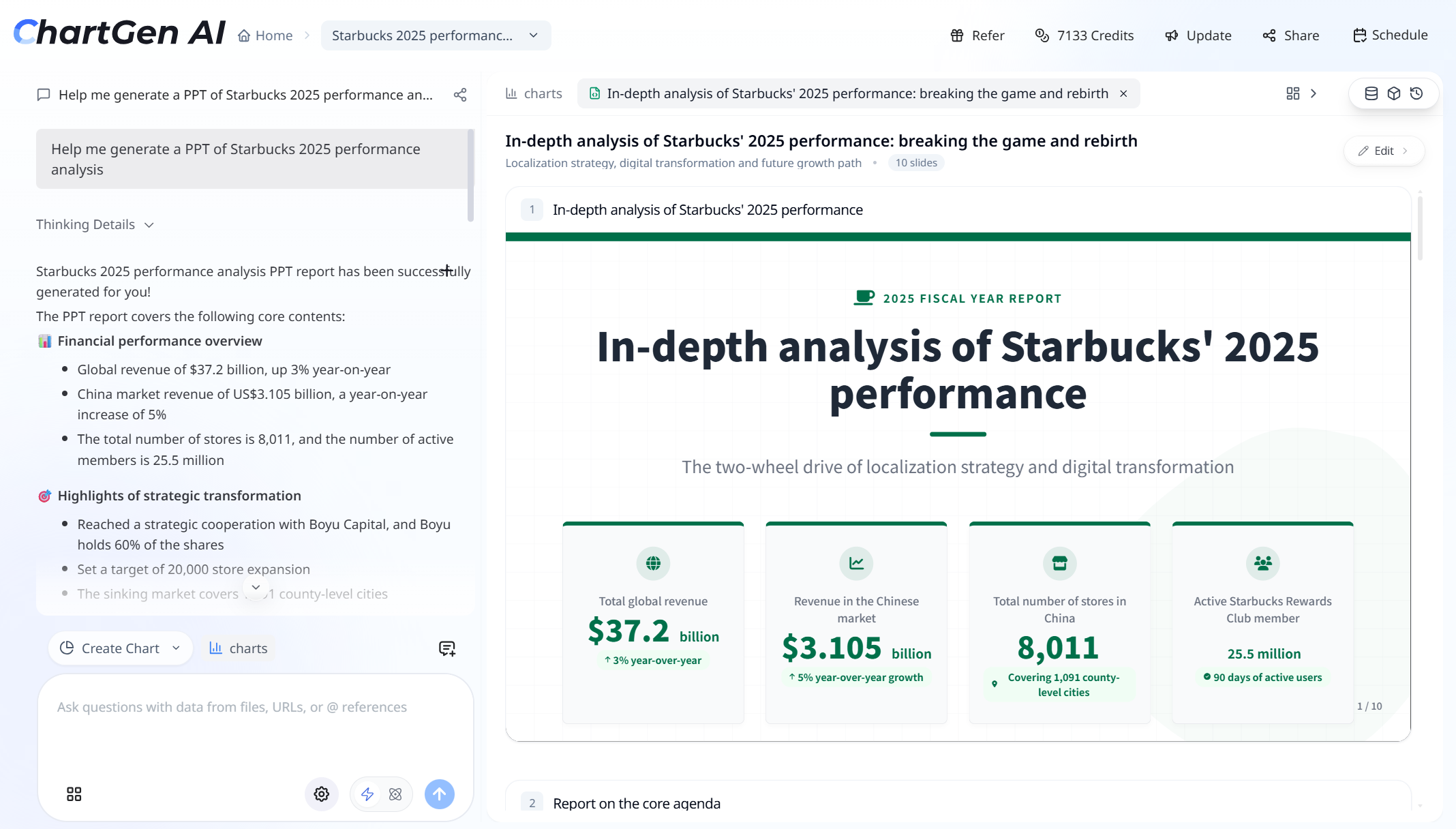
For example, a Starbucks analysis can include researched metrics like $37.2 billion revenue, 8,011 stores, and 25.5 million active members. The left panel surfaces thinking details and a structured summary so users can verify the reasoning before presenting.
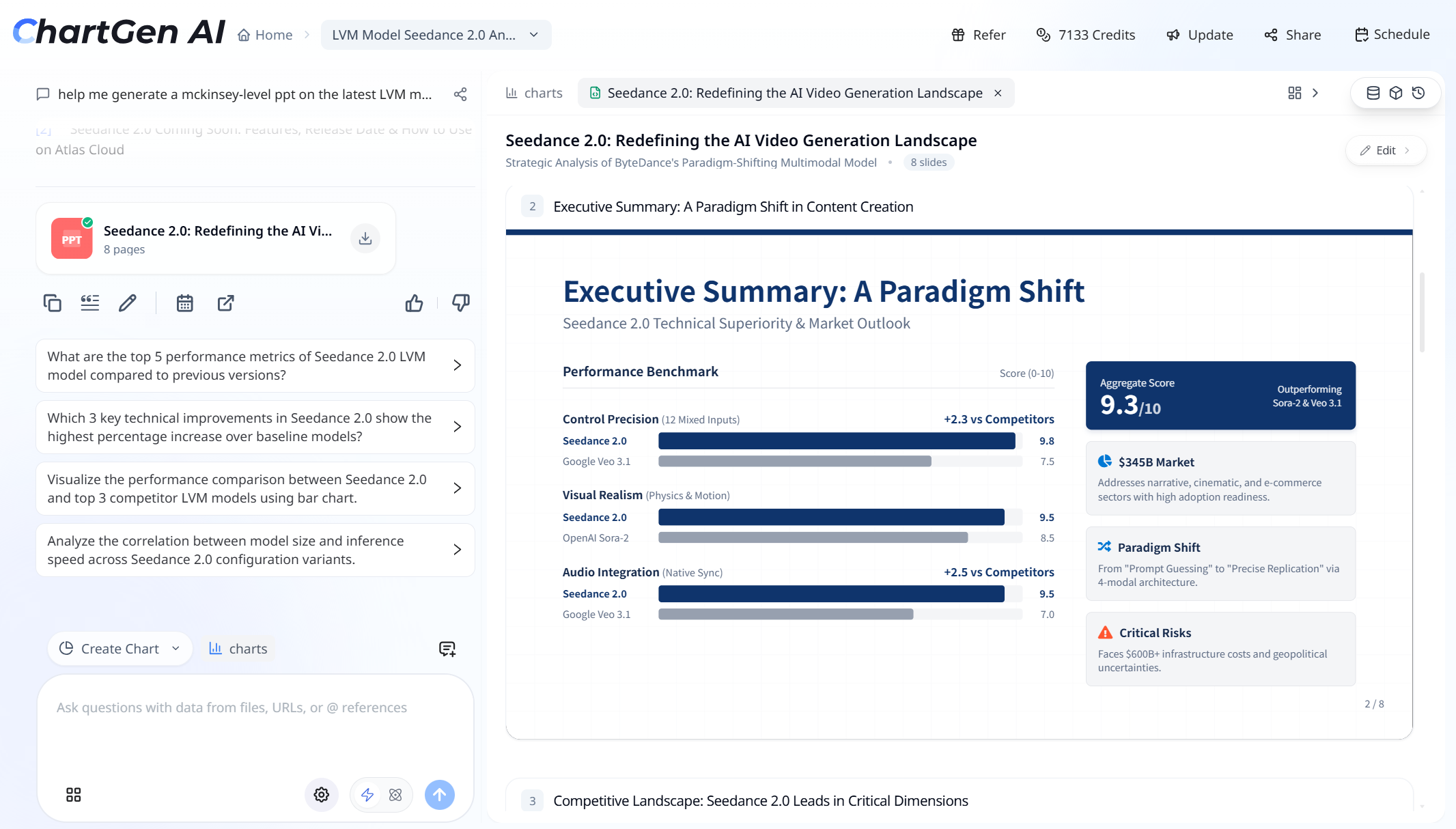
The same approach can support deeper competitive analysis, including quantified benchmark scores, market sizing, risk assessment, and narrative framing.
Step 2: Edit Anything, at Any Level
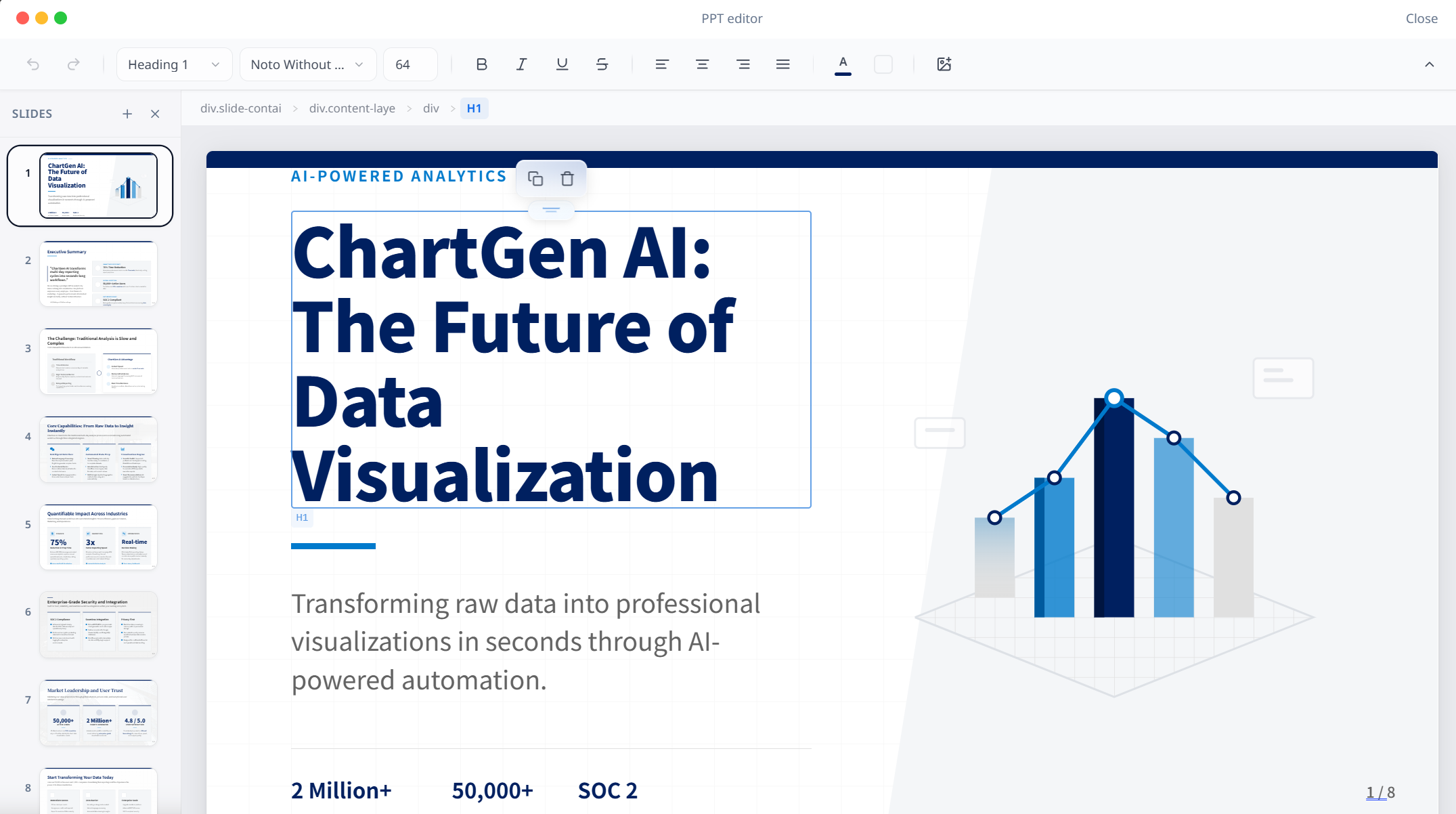
After generation, every slide element can be selected and edited:
- Click any heading, text block, chart, or image.
- Use rich-text controls for type, size, style, alignment, and color.
- Navigate the slide structure through DOM-level breadcrumbs.
- Add, remove, copy, delete, and reorder slide elements.
This is the opposite of the beautiful prison. Generate version one quickly, then refine it exactly the way the presentation requires.
Step 3: Explore Further With AI Follow-Up Questions
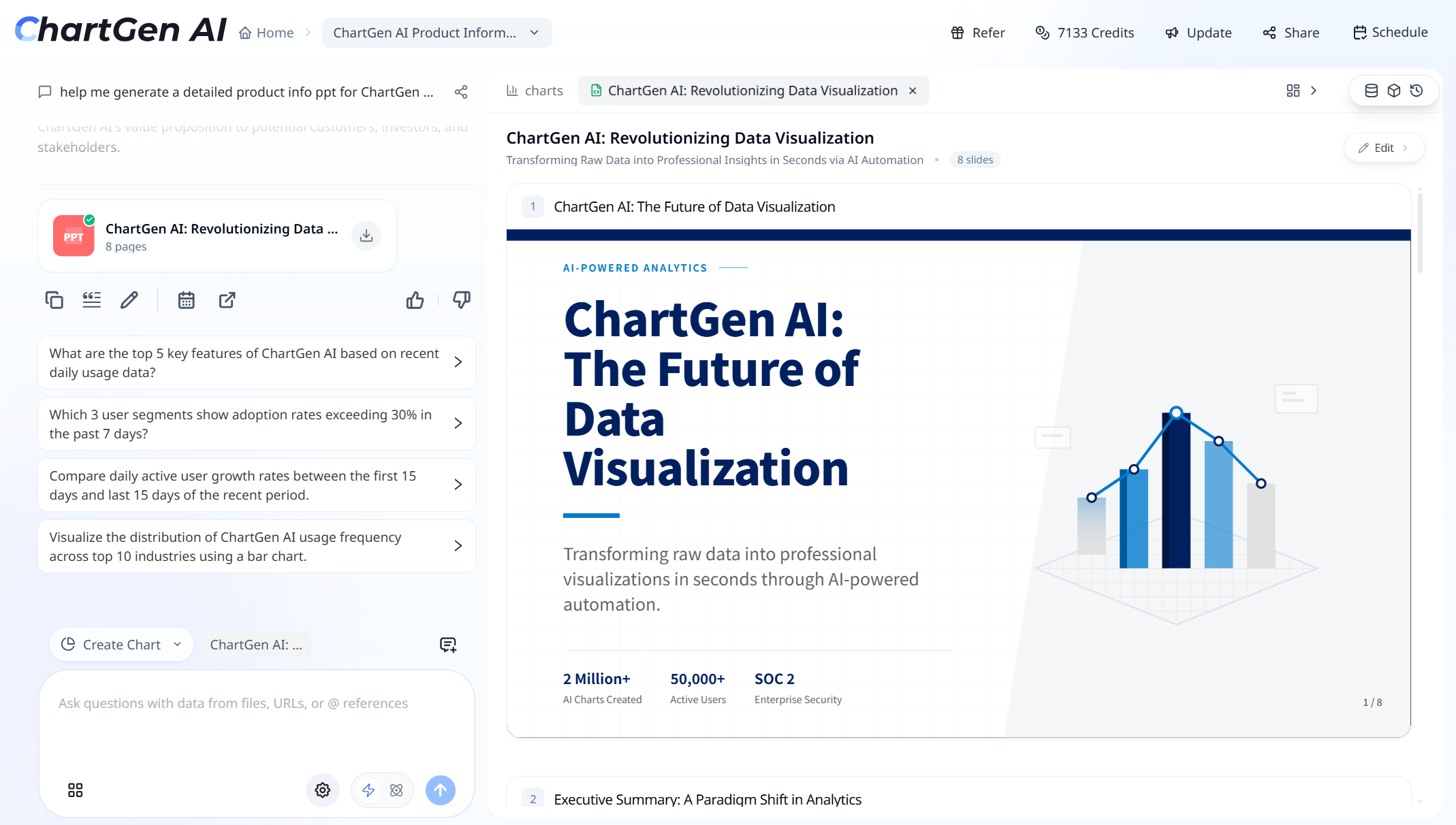
After the first deck is generated, ChartGen AI suggests contextual follow-up questions based on the data:
- What are the top 5 key features of ChartGen AI based on recent daily usage data?
- Which 3 user segments show adoption rates exceeding 30% in the past 7 days?
- Compare daily active user growth rates between the first 15 days and last 15 days.
- Visualize usage frequency across the top 10 industries using a bar chart.
Clicking a question generates additional charts, tables, or analysis that can be added to the deck. The workflow becomes iterative and data-driven instead of static and one-shot.
Side by Side: What Changed
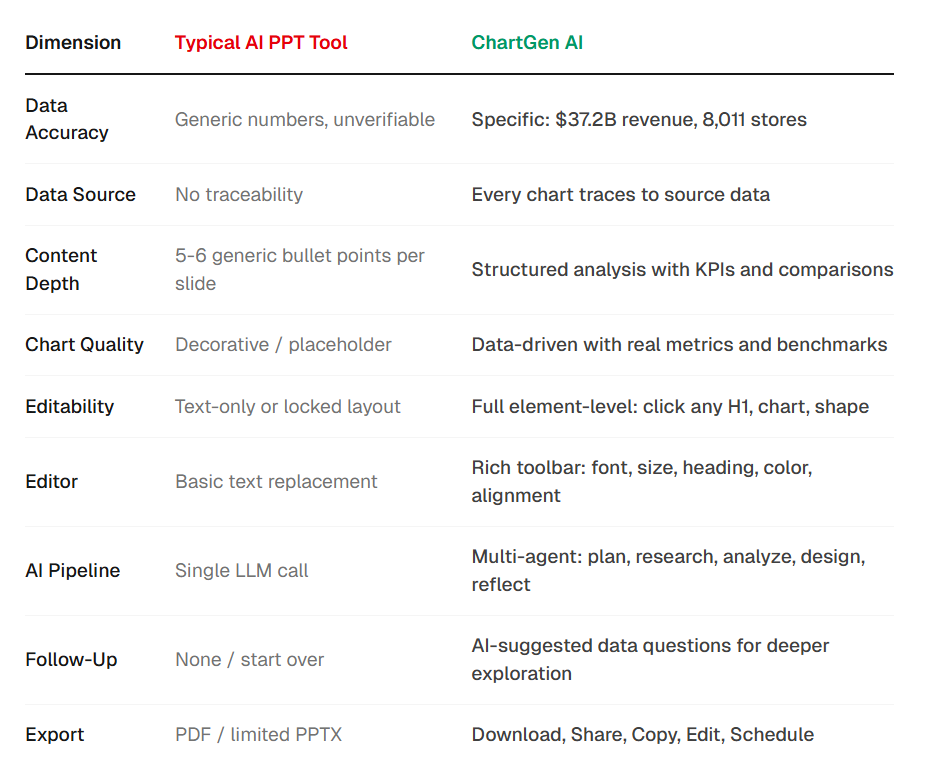
The difference is not just nicer slides. It is a different product philosophy:
- Generic tools optimize for fast, polished first drafts.
- Data-driven tools optimize for verified content, editable structure, and analytical depth.
Who This Is For
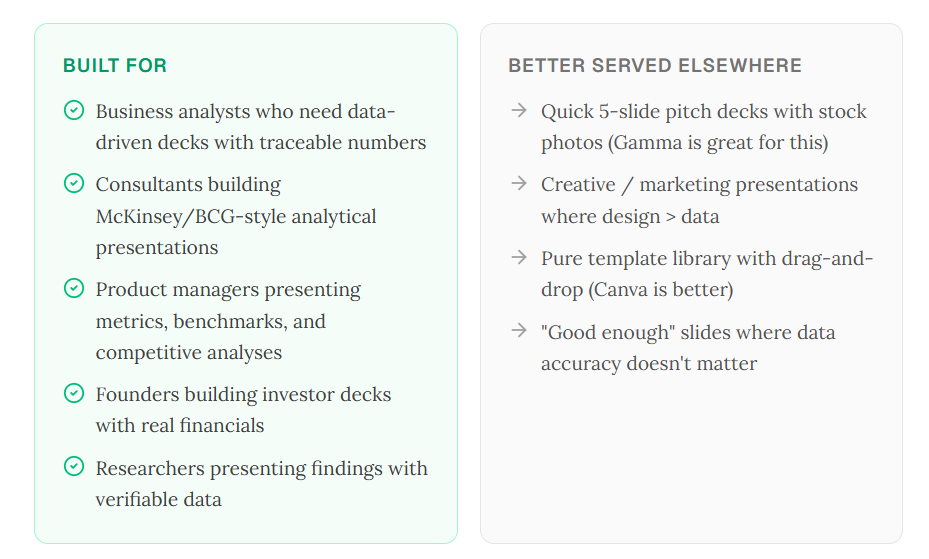
ChartGen AI is built for:
- Business analysts who need data-driven decks with traceable numbers.
- Consultants building analytical presentations.
- Product managers presenting metrics, benchmarks, and competitive analysis.
- Founders building investor decks with real financials.
- Researchers presenting findings with verifiable data.
Other tools may be better for quick 5-slide pitch decks, creative marketing presentations, pure template workflows, or good-enough slides where data accuracy does not matter.
Not every presentation needs McKinsey-level depth. But when the numbers matter, when every chart needs a source, and when the deck must survive executive scrutiny, the existing tools fall short.
Pretty Slides and Smart Slides Are Becoming Different Products
The AI presentation market is splitting into two tiers.
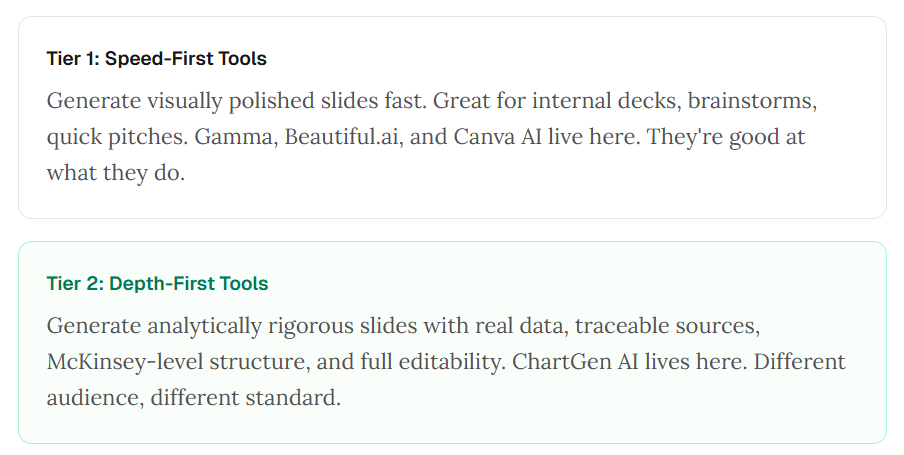
Tier 1 is speed-first: polished slides fast, useful for brainstorms, quick pitches, and internal drafts. Gamma, Beautiful.ai, and Canva AI fit here.
Tier 2 is depth-first: analytically rigorous slides with real data, traceable sources, professional structure, and full editability. ChartGen AI belongs in this second category.
Both tiers are valid. They serve different needs. But in 2026, the difference between a tool you demo and a tool you depend on is whether it can create a real presentation, not just generate slides.
References
- HTF Market Intelligence: AI Presentation Generators market, $1.5B in 2025 and $4.0B projected by 2033.
- Deckary: Gamma reached 70M users and a $2.1B valuation; Tome discontinued its presentation product.
- arXiv 2026: ChartAttack research on misleading charts from multimodal LLMs.
- OpenReview: research on factually inaccurate chart descriptions.
- chatslide.ai: documentation on static and image-based AI-generated PPT files.
- Alai Blog: Gamma export reliability and layout shift issues.
- ACL Anthology 2025: PPTAgent research on presentations beyond text-to-slides conversion.
- arXiv 2025: iterative self-verification for AI slide generation.