

Назад к примерам использования Использовать шаблон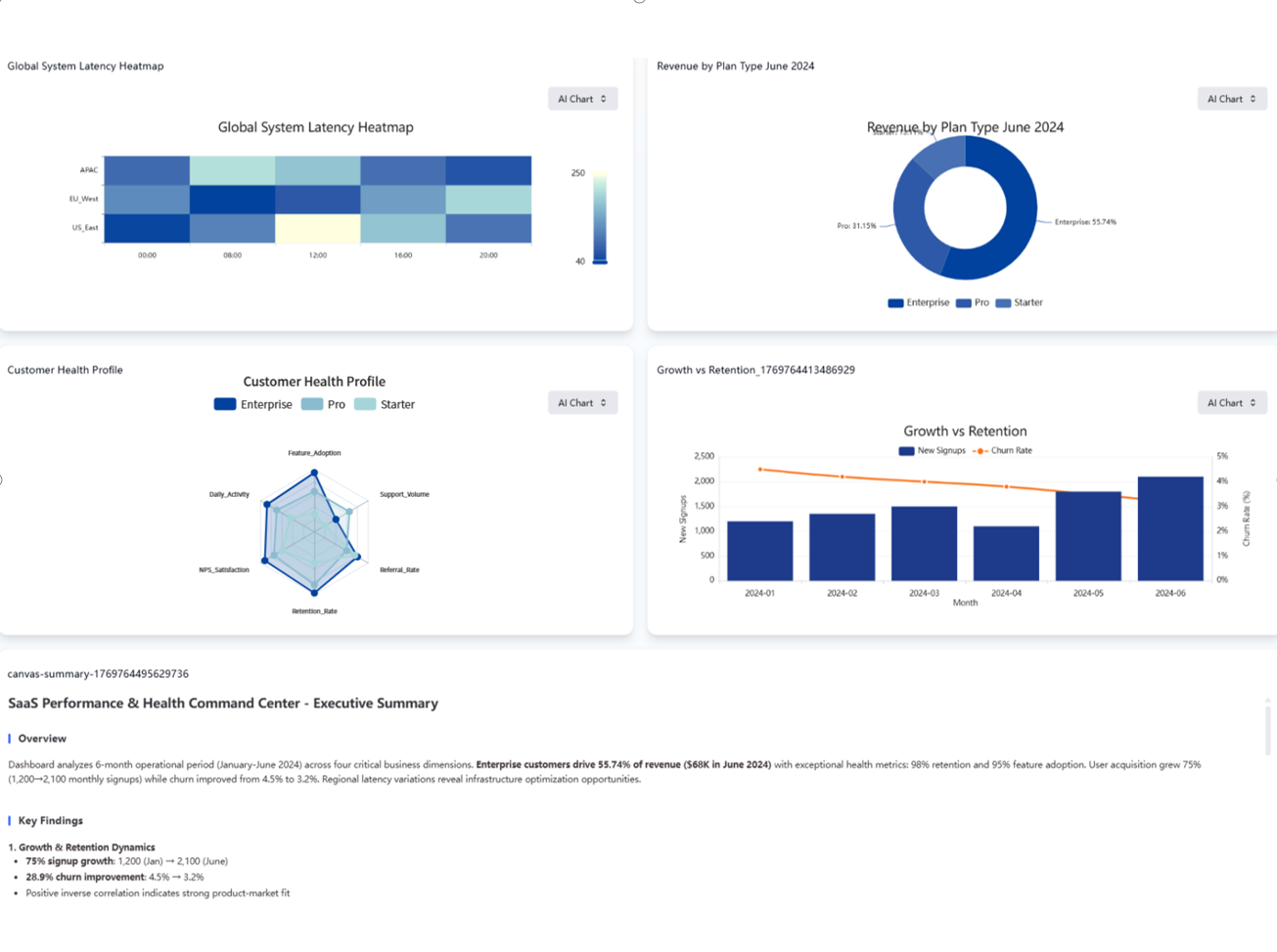
BUILD_DASHBOARD
H1 2024 SaaS Strategic Growth & Health Monitor
Description
Monitor key metrics across revenue, retention, and system latency in one view, so you can balance rapid growth with customer satisfaction and stability.
Input Settings
Action: dashboardDeep Think: falseWeb Search: Enable
Recommended Prompt
Task: Create a detailed SaaS Executive Dashboard with 4 distinct charts using the 2 provided data tables. Data Mapping: Table 1 (Monthly): Use for Chart 1 (Combo) and Chart 2 (Donut). Table 2 (Deep Dive): Use Columns A-D for Chart 3 (Radar). Use Columns F-H for Chart 4 (Heatmap). Chart Specifications (2x2 Layout): 1. Growth vs Retention (Bottom-Right) Type: Combo Chart (Line + Bar). X-Axis: Month. Bars: New_Signups (Color: Deep Blue). Line: Churn_Rate (Color: Orange/Red). Goal: Monitor user acquisition versus churn risk. 2. Revenue Composition (Top-Left) Type: Donut Chart. Data: Table 1 (Latest Month: June). Segments: Rev_Enterprise, Rev_Pro, Rev_Starter. Goal: Show revenue share by plan. 3. Customer Health Profile (Top-Right) [Key Visual] Type: Radar Chart (Spider Web). Data: Table 2 (Left Columns A-D). Variables: Metric_Name (e.g., Feature Adoption, NPS, Retention). Series: Compare Enterprise_Score (Blue) vs Pro_Score (Purple) vs Starter_Score (Grey). Style: Use semi-transparent polygon fills. Goal: Compare the "health shape" of different customer tiers. 4. Global System Latency (Bottom-Left) Type: Heatmap. Data: Table 2 (Right Columns F-H). X-Axis: Time_Block. Y-Axis: Region. Color: Latency_ms (Green=Fast, Red=Slow). Goal: Visualizing server load patterns. Design Theme: Style: High-Tech, Professional SaaS. Colors: Indigo, Blue, Teal, and White background. Title:SaaS Performance & Health Command Center
Sample Datasets
Business_Monthly.csv
291 B
Deep_Dive_Data.csv
698 B
User_Health_Profile.csv
200 B