


Every data team knows the pain: pull data from three sources, clean it, merge it, build a pivot table, create charts, format for presentation, email to stakeholders. Repeat weekly. Repeat monthly. Repeat forever.
Studies show data professionals spend 45% of their time on data preparation and repetitive reporting — not analysis or insight generation. That is nearly half your workweek spent on tasks that could be automated.
OpenClaw's agent framework can automate end-to-end data workflows, from ingestion to delivery, through natural language commands. But there is a gap: OpenClaw excels at data processing, but visualization quality remains a challenge. Built-in chart skills produce functional output, not presentation-ready graphics.
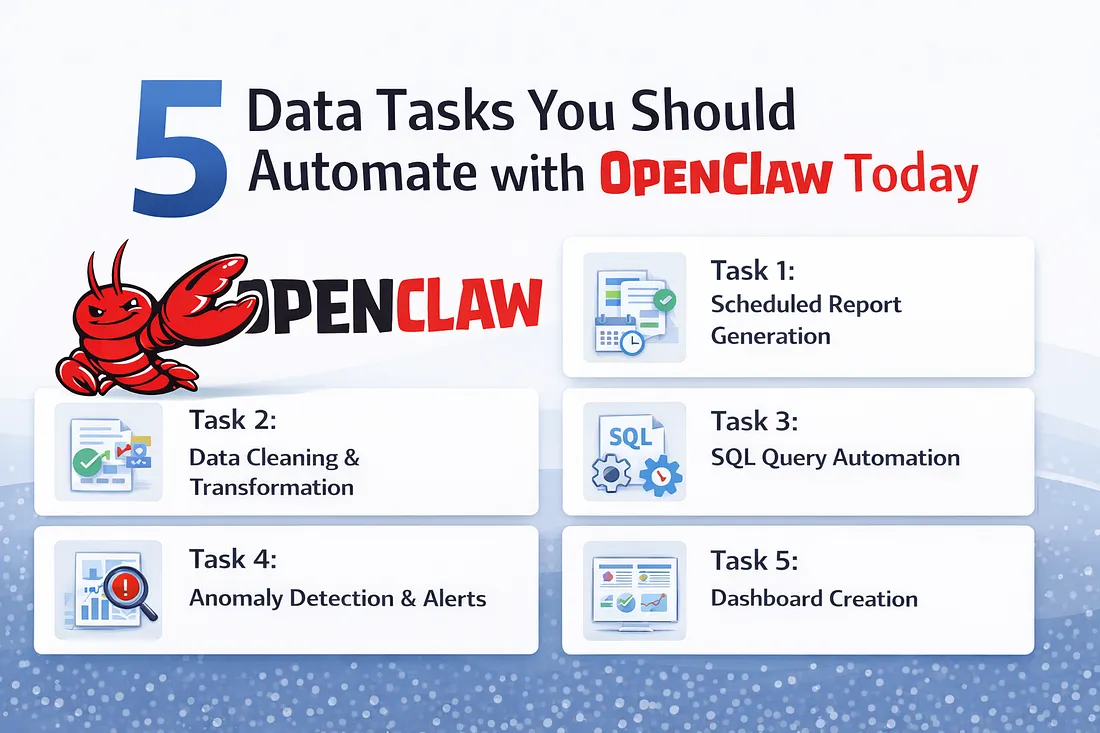
This guide covers the five tasks that deliver the highest ROI for data teams adopting OpenClaw. Master these, and you will reclaim hours every week.
What You'll Learn
- Task 1: Scheduled Report Generation
- Task 2: Data Cleaning & Transformation
- Task 3: SQL Query Automation
- Task 4: Anomaly Detection & Alerts
- Task 5: Dashboard Creation
- The gap: Why visualization needs specialized agents
1. Scheduled Report Generation
Monday morning reports, ready before you wake up
The Pain Point
Every Monday morning, someone on your team spends two hours pulling last week's data, formatting it into a report, and emailing it to stakeholders. It is predictable, repetitive, and soul-crushing.
The OpenClaw Solution
User:
Every Monday at 7am, pull last week's sales data from the Salesforce CSV export, create a summary by region and product, format as an Excel report with charts, and send to #sales-team on Slack.
What OpenClaw does:
- Cron job triggers at 7am Monday
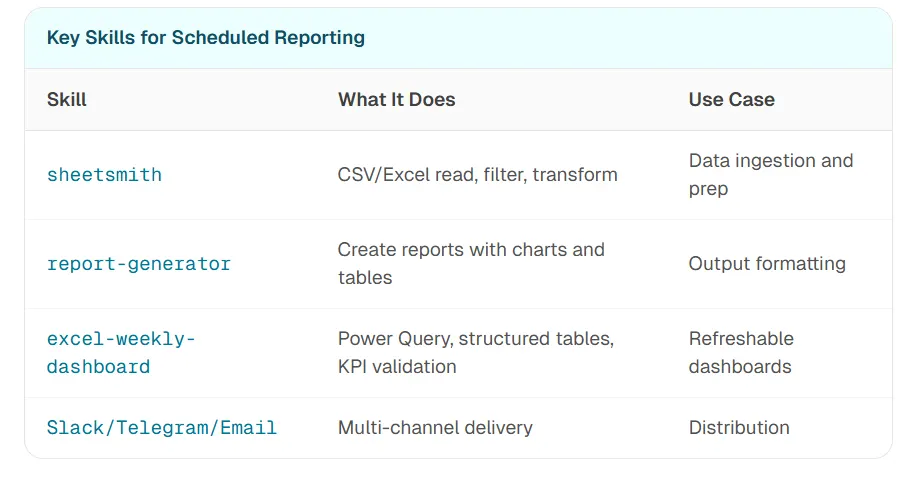
sheetsmithskill reads the CSV export- Data transformation aggregates by region and product
report-generatorskill creates formatted Excel with charts- Slack integration delivers to #sales-team
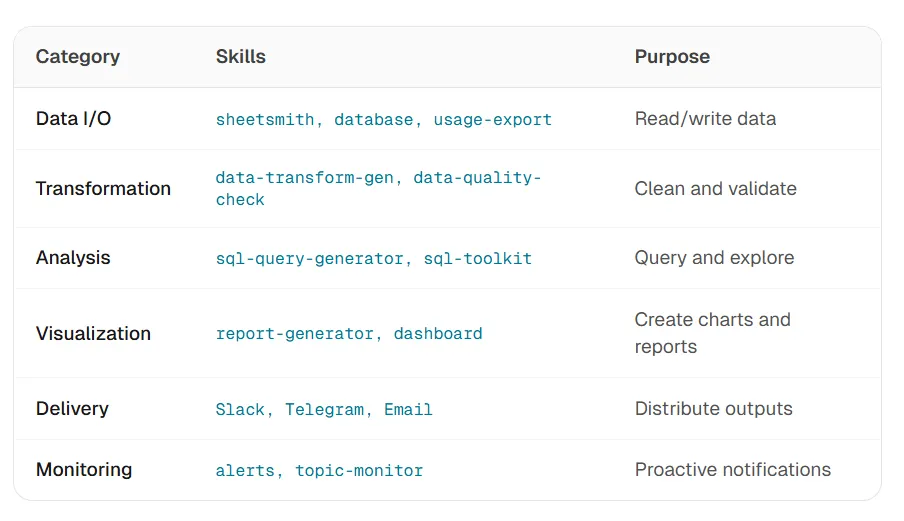
Key Skills for Scheduled Reporting
Advanced: Auto-Stagger Scheduling
OpenClaw's 2026 cron updates include auto-stagger scheduling — if you have 10 reports scheduled for Monday 7am, it automatically staggers them to prevent rate-limit errors and API overload.
"The magic isn't one-time automation — it's 'set and forget' scheduling. Reports run whether you're asleep, on vacation, or in back-to-back meetings."
2. Data Cleaning & Transformation
From messy CSVs to analysis-ready data
The Pain Point
Raw data is never clean. Column names are inconsistent. Dates are in three different formats. There are nulls everywhere. You spend an hour cleaning before you can even start analyzing.
The OpenClaw Solution
User:
Take these three CSV files, standardize the date columns to YYYY-MM-DD, remove rows where revenue is null, merge them on customer_id, and output a clean combined file.

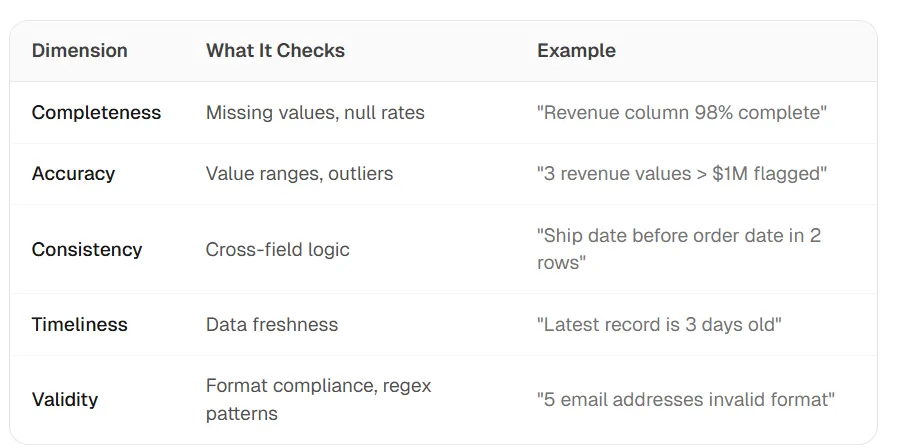
Data Quality Validation
The data-quality-check skill validates data against five dimensions:

"Data cleaning isn't a one-time task — it's a recurring workflow. Automate the pipeline, not just the individual steps."
3. SQL Query Automation
Natural language to parameterized queries
The Pain Point
You know what data you need, but writing the SQL takes time. Worse, ad-hoc queries are often insecure — no parameterization, no validation, vulnerable to injection.
The OpenClaw Solution
User:
Show me all customers who made purchases over $500 in the last 30 days, grouped by region, sorted by total revenue descending.
What OpenClaw does:
sql-query-generatorparses natural language intent- Schema awareness understands your database structure
- Parameterized query generated with proper escaping
- Validation checks syntax before execution
- Results returned in readable format
| Skill | Purpose | Databases |
| sql-query-generator | Natural language → parameterized SQL | SQLite, PostgreSQL, MySQL |
| sql-toolkit | Query, design, migrate, optimize | Multi-database |
| database | Connect, query, manage schemas | SQL and NoSQL |
Security First
The sql-query-generator skill includes built-in safeguards: parameterized queries prevent injection, read-only mode for analytics queries, schema validation before execution, and audit logging for compliance.
"Natural language SQL isn't just about convenience — it's about democratizing data access while maintaining security."
4. Anomaly Detection & Alerts
Know about problems before your boss does
The Pain Point
By the time you notice revenue dropped 30% or API costs spiked 5x, it is too late. You are in reactive mode, explaining what went wrong instead of preventing it.
The OpenClaw Solution
User:
Monitor our daily revenue. If it drops more than 15% compared to the 7-day average, send an alert to #revenue-alerts on Slack with the breakdown by product category.
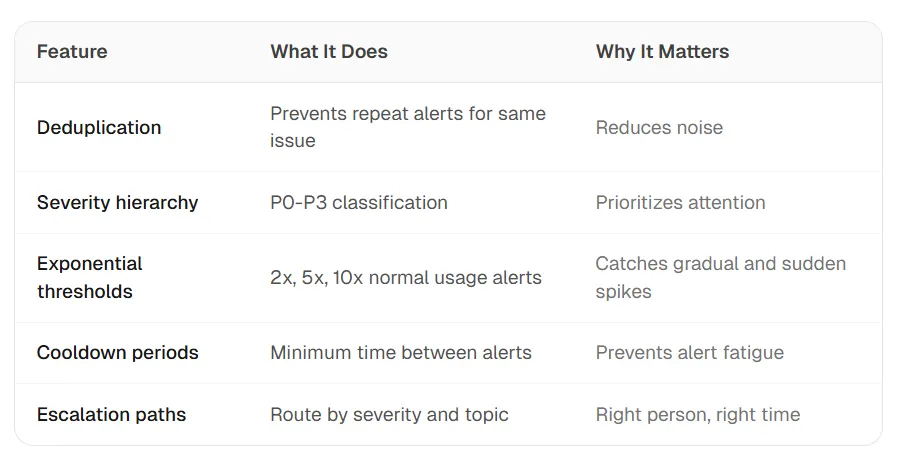
Smart Alerting Features
Multi-Channel Delivery
Alerts route to different channels based on severity:
- P0 (Critical): SMS + Slack + Telegram (immediate)
- P1 (High): Slack + Email
- P2 (Medium): Slack only
- P3 (Low): Daily digest email
"The best alert systems fire rarely but accurately. OpenClaw's deduplication and thresholds mean you trust the alerts you receive."
5. Dashboard Creation
Local dashboards without the SaaS tax
The Pain Point
You need a dashboard, but Tableau is expensive, Power BI requires IT setup, and Google Data Studio has limitations. You just want to see your KPIs without a multi-week project.
The OpenClaw Solution
User:
Create a dashboard showing: weekly revenue trend (line chart), revenue by region (bar chart), top 10 customers (table), and month-over-month growth (KPI cards). Use data from sales_data.csv. Make it refreshable.
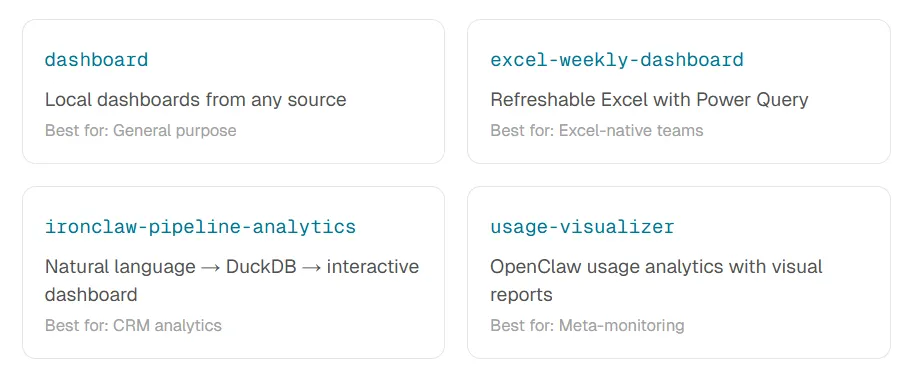
| Skill | Best for |
| dashboard | General-purpose local dashboards from any source |
| excel-weekly-dashboard | Refreshable Excel with Power Query |
| ironclaw-pipeline-analytics | Natural language → DuckDB → interactive dashboard (CRM) |
| usage-visualizer | OpenClaw usage analytics with visual reports |
The Limitation: Visualization Quality
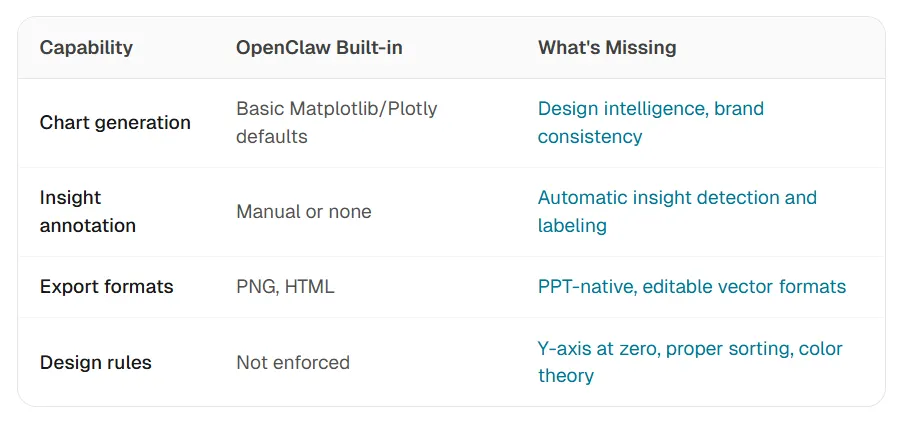
Here is the honest truth: OpenClaw's dashboard skills produce functional charts, but they are not presentation-ready. The defaults are adequate for internal analysis, but if you need to put these in a board deck or client presentation, they need polish.
Common issues:
- Default color schemes lack sophistication
- Annotations and insights are not automatic
- Export formats limited (no native PPT)
- Design rules not enforced (truncated axes, rainbow colors)
"OpenClaw is excellent at data orchestration. Visualization quality is the remaining gap for data teams."
The Missing Piece: Why Visualization Needs Specialized Agents
OpenClaw handles the pipeline. ChartGen AI handles the polish.
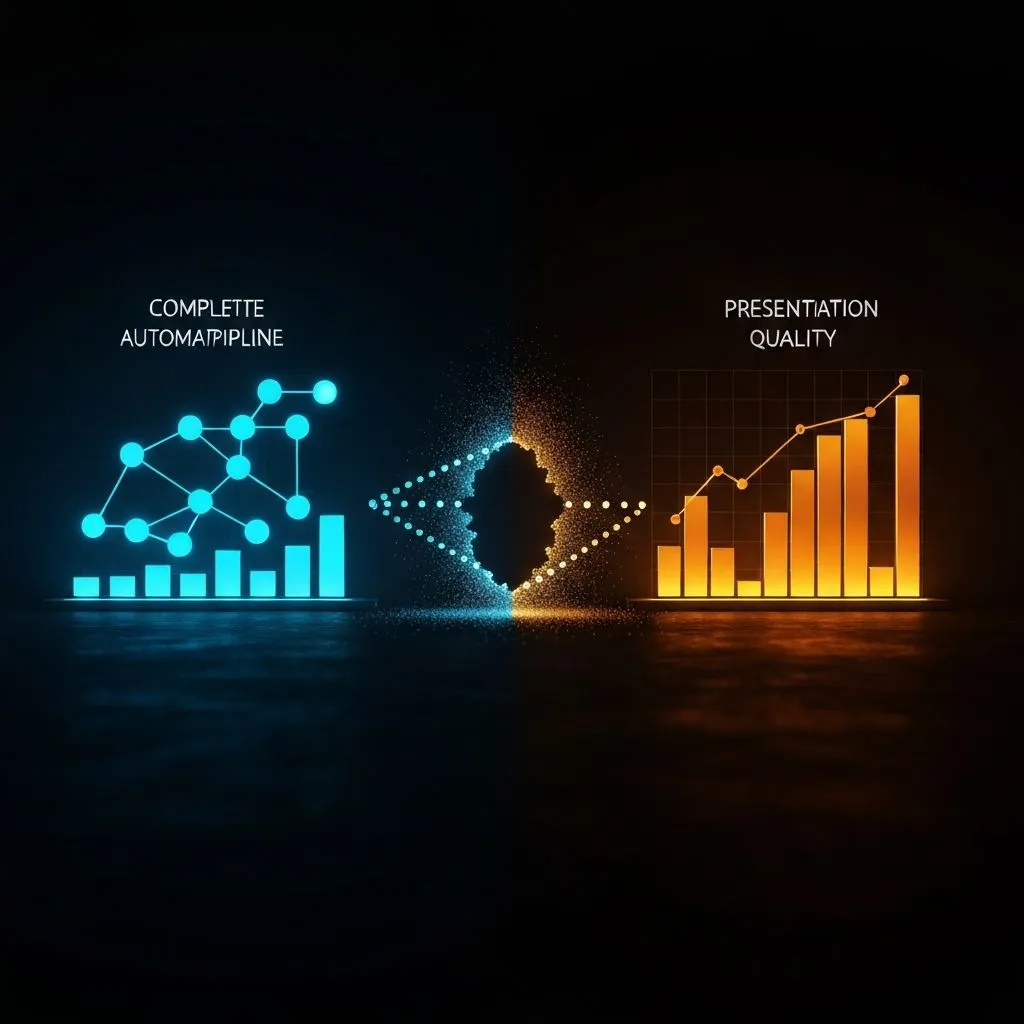
The Visualization Gap in Data Workflows
Why General Agents Struggle with Visualization
Visualization is not just data transformation — it is communication design. A general-purpose agent can create a bar chart, but it will not know whether to use vertical or horizontal orientation, how to highlight the key insight, which colors work together, or what annotations add value versus clutter.
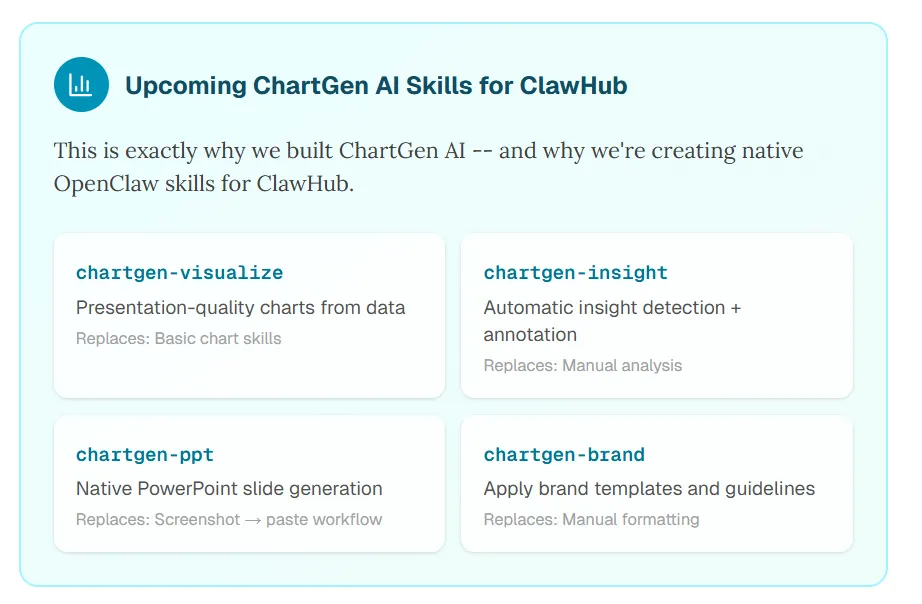
Upcoming ChartGen AI Skills for ClawHub
This is exactly why we built ChartGen AI — and why we are creating native OpenClaw skills for ClawHub.
Skill               Replaces                    Purpose
chartgen-visualize  Basic chart skills          Presentation-quality charts from data
chartgen-insight    Manual analysis             Automatic insight detection + annotation
chartgen-ppt        Screenshot → paste workflow Native PowerPoint slide generation
chartgen-brand      Manual formatting           Apply brand templates and guidelines
The Integration Vision
User:
Take last week's sales data, analyze trends, create a presentation-ready dashboard with insights highlighted, and export as a PowerPoint deck for the Monday meeting.
What the integrated workflow does:
sheetsmithreads and cleans data- OpenClaw analysis identifies trends and anomalies
chartgen-visualizecreates polished, design-intelligent chartschartgen-insightadds automatic annotationschartgen-pptexports as native PowerPoint- Delivery sends to Slack/email
"The promise of AI automation is end-to-end: from raw data to stakeholder-ready output. ChartGen AI's OpenClaw skills close the visualization gap. The pipeline handles data. The specialized agent handles presentation."
Getting Started: Your First Data Automation
From zero to automated report in 15 minutes
Quick Start
# Install OpenClaw
curl -fsSL https://openclaw.ai/install.sh | bash
# Add essential data skills
openclaw skill add sheetsmith
openclaw skill add report-generator
openclaw skill add sql-query-generator
# Start the agent
openclaw
Your First Automation
User:
Read the file ~/Downloads/sales_q1.csv, show me a summary of revenue by region, and save the results to ~/Reports/q1_summary.xlsx
Recommended Skill Stack for Data Teams
Essential skills: sheetsmith, report-generator, sql-query-generator, data-quality-check, dashboard, and alerts — chained for ingestion through delivery.
Best Practices
- Start with one workflow — do not try to automate everything at once
- Use Skills, not ad-hoc prompts — Skills ensure consistency and prevent drift
- Add quality gates — validate data before transformation, validate output before delivery
- Schedule conservatively — start weekly, move to daily once stable
- Monitor your automations — set up alerts for failed jobs
Frequently Asked Questions
What data tasks can OpenClaw automate?
OpenClaw can automate scheduled report generation, data cleaning and transformation, SQL query generation, anomaly detection and alerts, and dashboard creation. It excels at end-to-end pipelines that chain multiple operations from data ingestion to delivery.
What are the best OpenClaw skills for data teams?
Essential skills include sheetsmith (CSV/Excel processing), report-generator (formatted reports with charts), sql-query-generator (natural language to SQL), data-quality-check (validation), dashboard (local dashboard creation), and alerts (anomaly monitoring).
Can OpenClaw create presentation-quality charts?
OpenClaw's built-in visualization skills produce functional charts suitable for internal analysis. For presentation-ready output with design intelligence, brand consistency, and automatic insights, specialized visualization agents like ChartGen AI are recommended.
How do I schedule automated reports with OpenClaw?
OpenClaw has a built-in cron system. Simply ask: "Schedule this to run every Monday at 8am." You can add multi-channel delivery (Slack, Telegram, email) and set up auto-stagger scheduling to prevent rate-limit issues.
Automate the Pipeline, Specialize the Polish
OpenClaw handles 80% of the data workflow: ingestion, cleaning, transformation, analysis, basic visualization, and delivery. This is the repetitive work that consumes data teams' time.
The remaining 20% — presentation-quality visualization, insight annotation, stakeholder-ready output — benefits from specialization.
The winning stack for data teams in 2026: OpenClaw for orchestration, specialized agents for domain expertise.
Start with the five tasks in this guide: scheduled reporting, data cleaning, SQL automation, anomaly alerts, and dashboard creation. These deliver the highest ROI.
Close the Visualization Gap
Try OpenClaw for your data workflows. Follow ChartGen AI for updates on our ClawHub skills — bringing presentation-quality visualization to the OpenClaw ecosystem.
Key Takeaways
- Data teams lose nearly half their week to prep and repetitive reporting — five workflows reclaim the highest ROI first.
- OpenClaw chains skills (
sheetsmith,report-generator,sql-query-generator,data-quality-check,dashboard, alerts) from ingestion to delivery. - Cron plus auto-stagger scheduling makes "set and forget" reporting realistic at scale.
- Built-in charts are functional for internal use; board-ready polish needs a specialized visualization agent like ChartGen AI.
- The integrated vision: OpenClaw orchestrates the pipeline; ChartGen AI skills handle design, insights, and native PPT export.