


The $500 Wake-Up Call
Last month my OpenClaw API bill hit $500. I had 85+ sessions running, 38 cron jobs, and no idea which ones were burning through tokens. The built-in /status command told me I spent 4.85M tokens. It did not tell me why.
The Visibility Gap
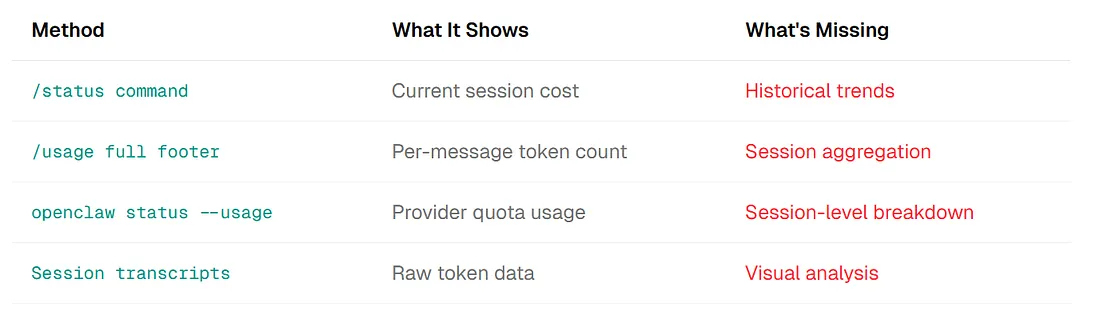
OpenClaw provides basic usage tracking, but no historical trends, no session-level breakdown, no efficiency metrics, no cron versus interactive comparison, and no actionable insights.
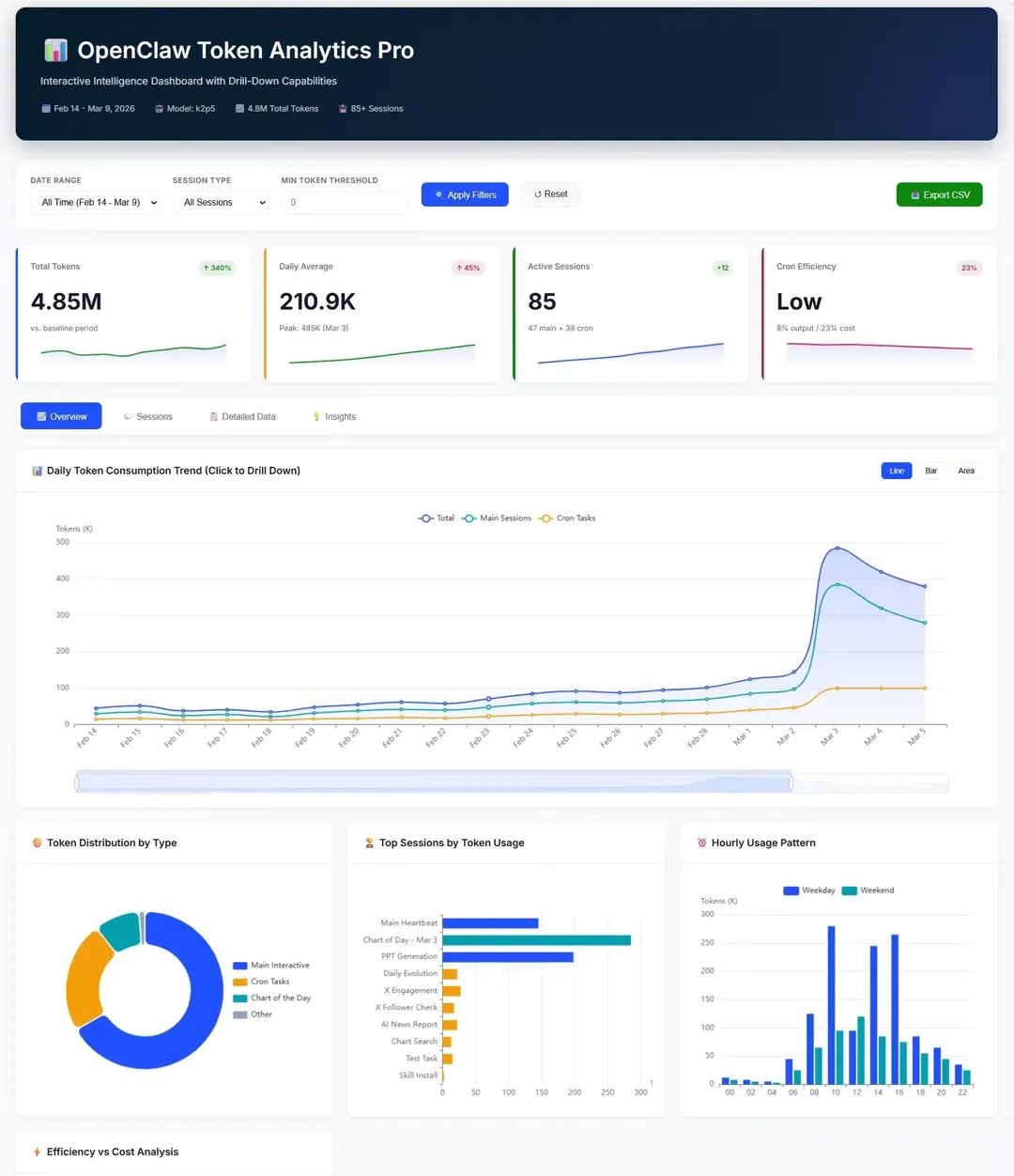
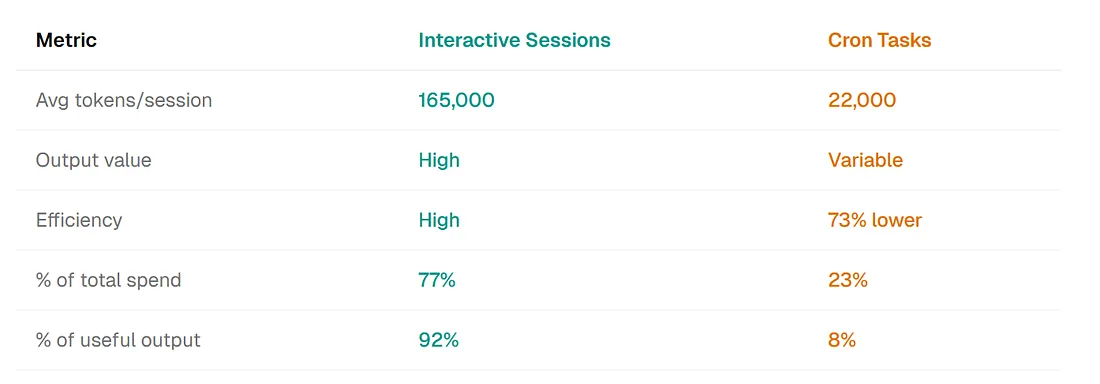
When I finally built a proper analytics dashboard, I discovered my cron tasks had 73% lower efficiency than interactive sessions — and were consuming 23% of my budget for just 8% of useful output.

The OpenClaw Token Visibility Problem
Built-in tracking tells you what. Not why. Here is what OpenClaw provides natively versus what operators actually need:
The Real Questions Users Have
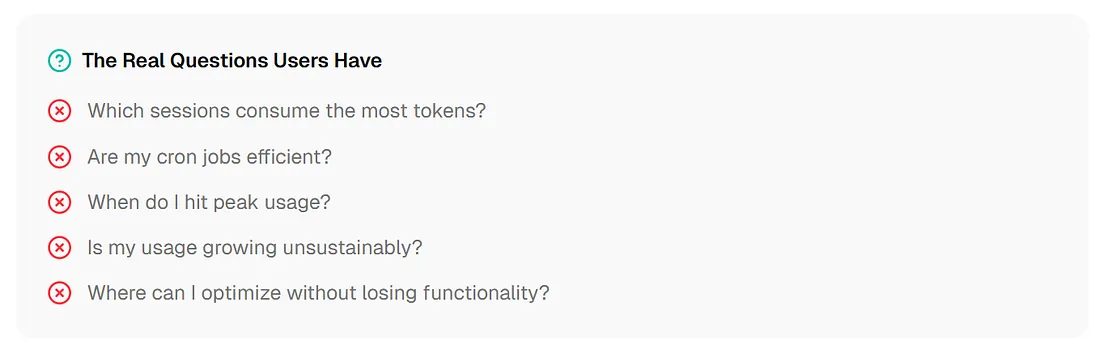
- Which sessions consume the most tokens?
- Are my cron jobs efficient?
- When do I hit peak usage?
- Is my usage growing unsustainably?
- Where can I optimize without losing functionality?
“All existing tools output data — CSV files, JSON, text reports. None of them give you what a data analyst actually needs: an interactive dashboard with drill-down, filtering, multiple chart types, and automated insights. That is the gap I needed to fill.”
Why Token Analytics Matters More in 2026
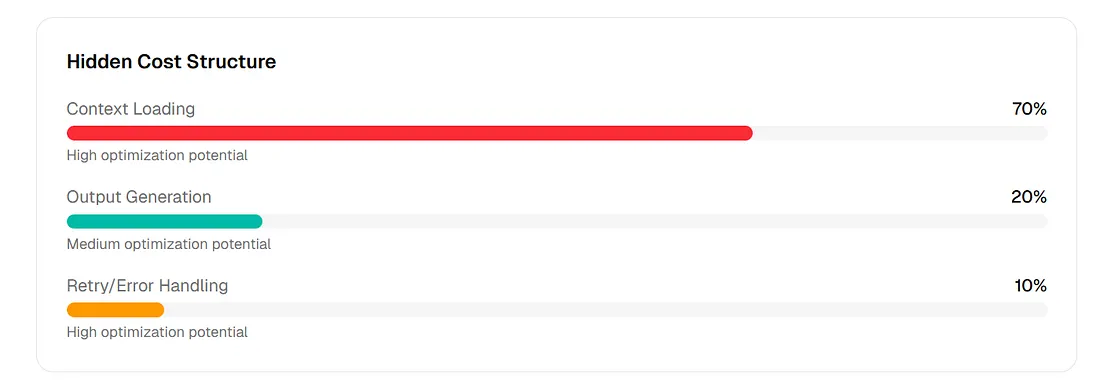
Most OpenClaw users do not realize: the majority of their token spend is not generating new value — it is loading context. Studies show 70% of token consumption is repeat context, not new output.
Hidden Cost Structure
| Spend bucket | Percent |
| Context Loading | 70% |
| Output Generation | 20% |
| Retry/Error Handling | 10% |
The Cron Task Problem
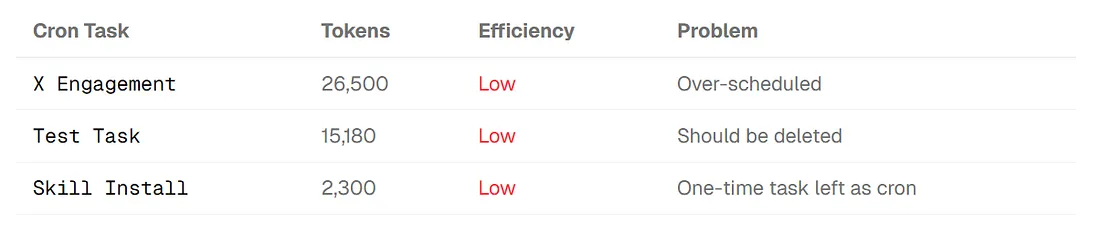
My dashboard revealed a pattern I had not seen: cron tasks were fundamentally less efficient than interactive sessions.
The Growth Curve Challenge
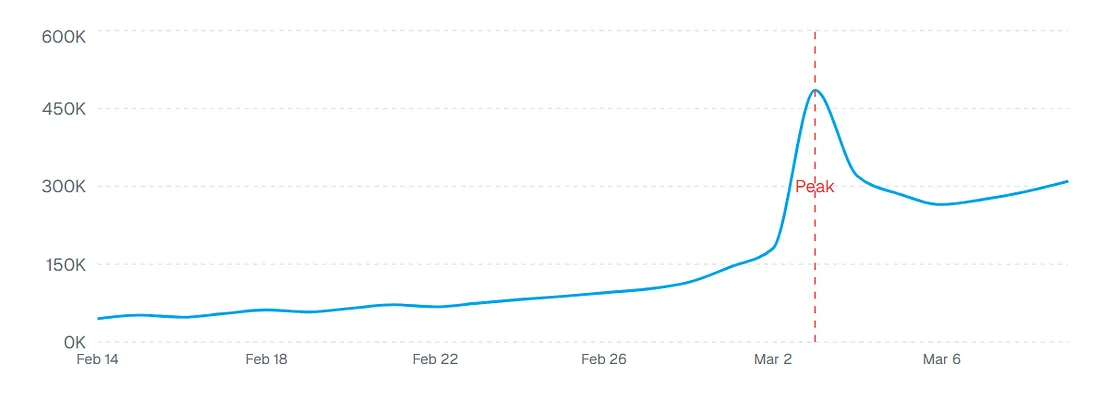
My token consumption grew 340% from Feb 14 to Mar 9. Without a dashboard, I would not have seen this coming — and would not have known which sessions drove the spike.
Building the Dashboard: ChartGen AI’s Dashboard Generator
From CSV export to interactive analytics in 30 minutes. Here is the workflow I used with ChartGen AI’s Dashboard Generator:
Export Data
openclaw skill run usage-exportGenerate daily CSV files with hourly aggregates.
Upload to ChartGen AI
"Create an interactive dashboard for OpenClaw token analytics..."Natural-language prompt describing the dashboard requirements.
Iterate and Refine
"Add efficiency scoring for each session"Refine with follow-up prompts for additional features.
What ChartGen AI Generated
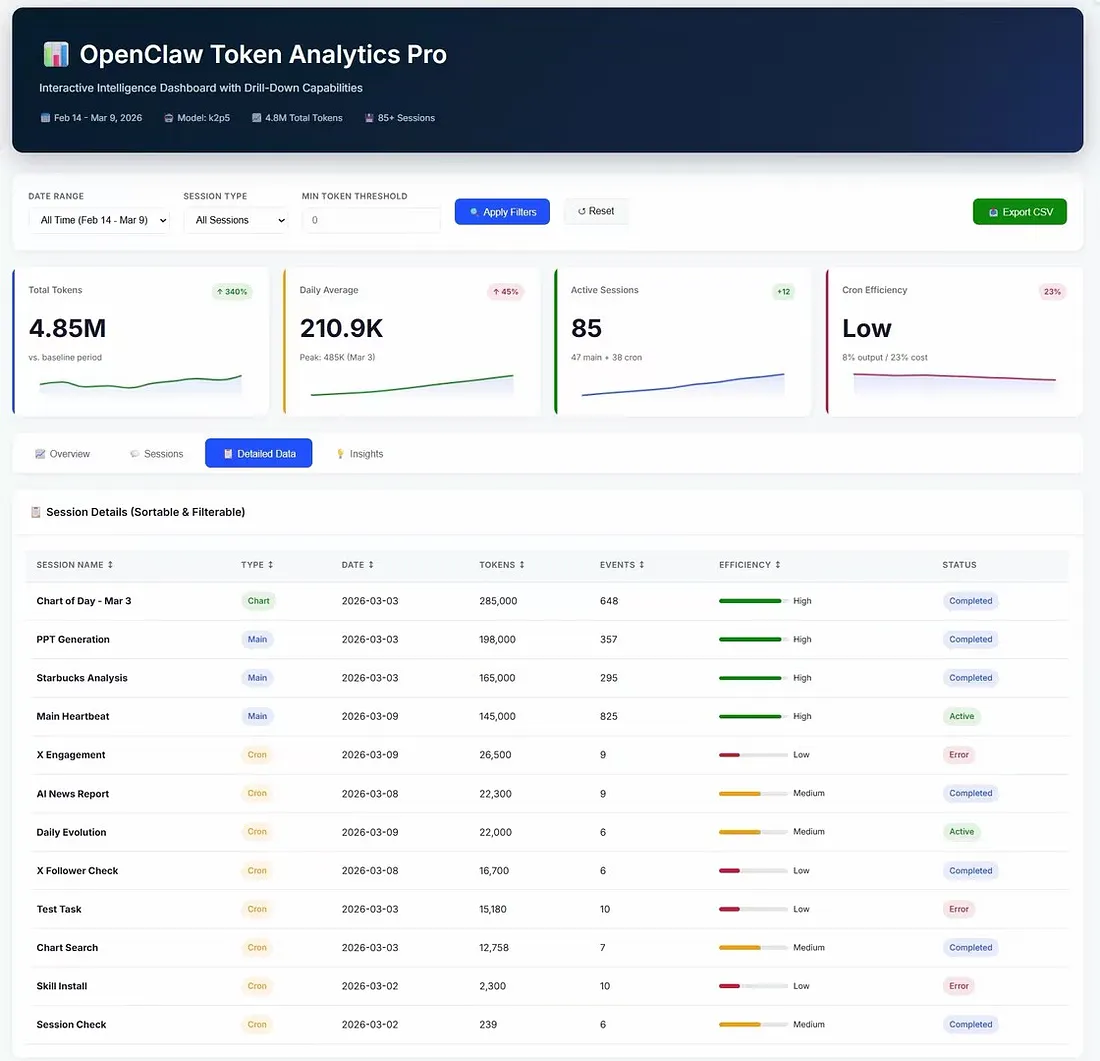
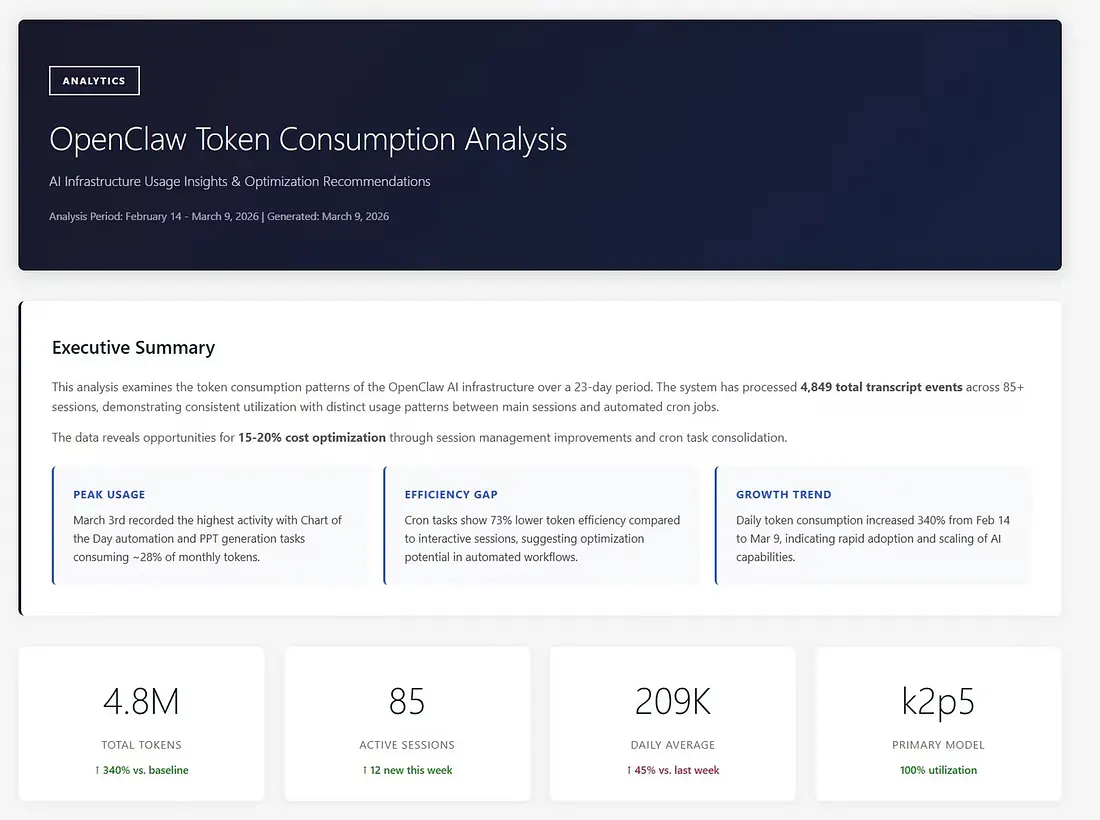
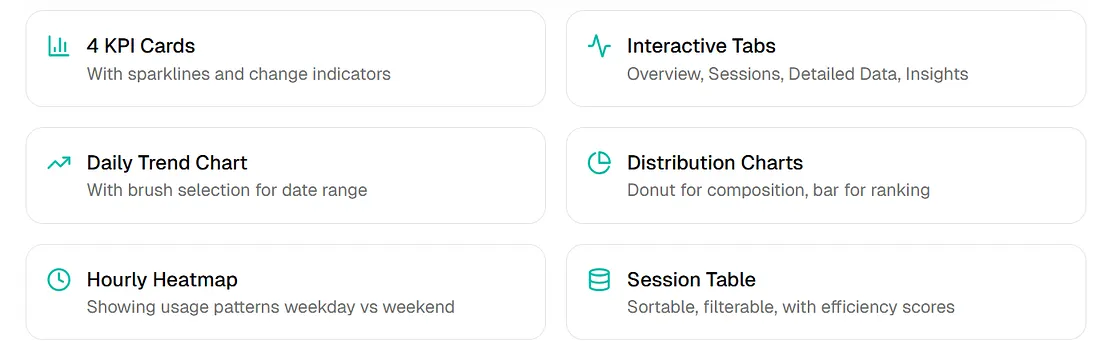
- Four KPI cards with sparklines and change indicators
- Interactive tabs: Overview, Sessions, Detailed Data, Insights
- Daily trend chart with brush selection for date ranges
- Distribution charts: donut for composition, bar for ranking
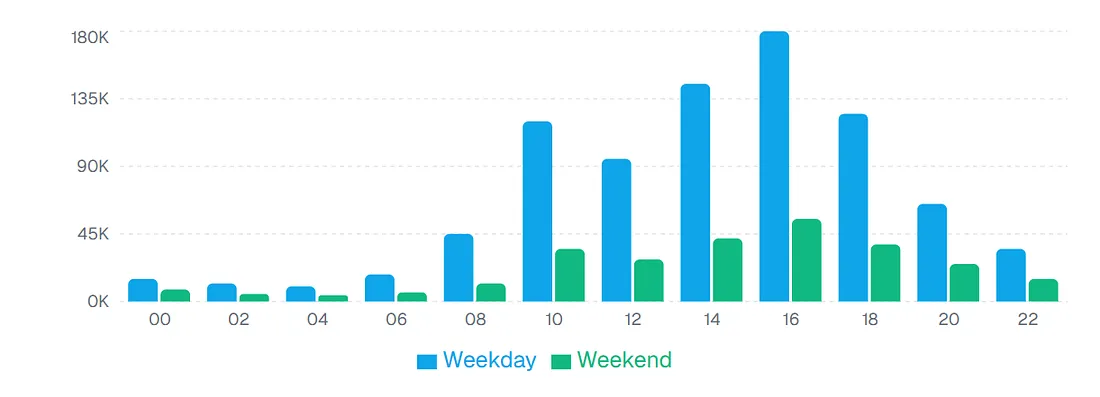
- Hourly heatmap: usage patterns weekday versus weekend
- Session table: sortable, filterable, with efficiency scores
Session-Level Analytics
The Insights That Changed My Behavior
Data I already had. Patterns I had never seen. Here are four insights that emerged from the dashboard:
1. The March 3rd Spike
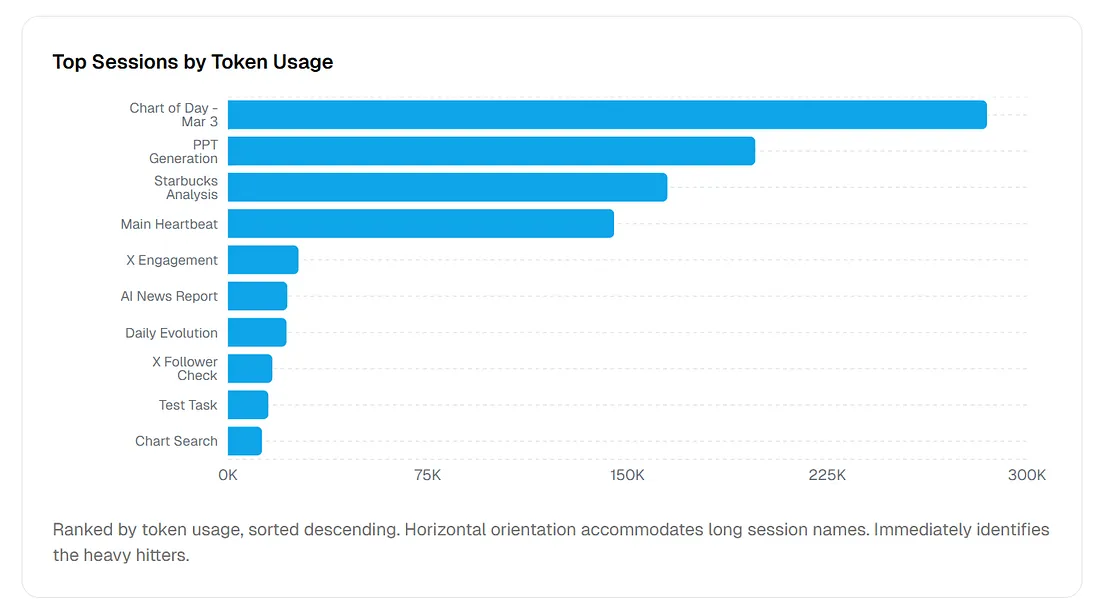
The daily trend chart revealed a massive spike on March 3rd — 485K tokens in one day, consuming roughly 28% of my monthly total. Drill-down showed two culprits: “Chart of Day” automation (285K) and “PPT Generation” (198K).
Action taken: moved heavy generation tasks to off-peak scheduling and added token limits per session.
2. The Cron Efficiency Gap
The efficiency metric exposed a pattern: cron tasks showed 73% lower efficiency than interactive sessions. They were consuming 23% of my budget but producing only 8% of useful output.
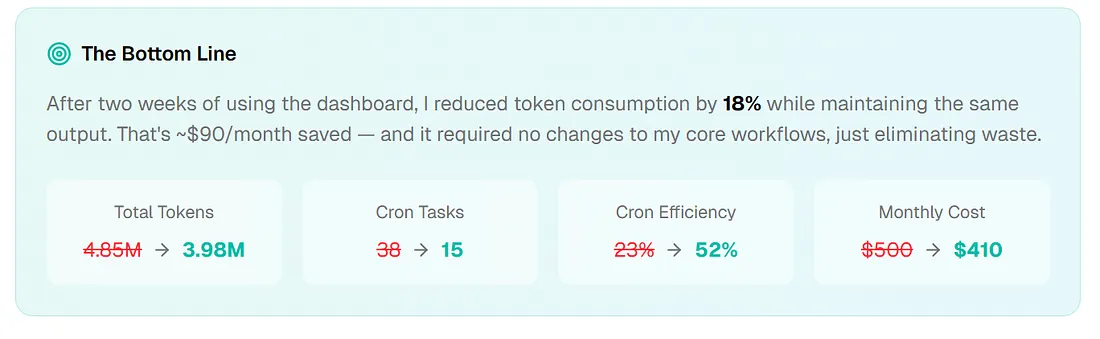
Action taken: consolidated 38 cron tasks to 15, deleted abandoned test tasks, and changed hourly to daily where appropriate.
3. The Weekday/Weekend Pattern
The hourly usage chart revealed I was running full cron schedules on weekends when no one was consuming the output. Weekend usage averaged 50K tokens per day for near-zero value.
Action taken: implemented weekend scheduling reduction for non-critical tasks.
4. The 340% Growth Trend
Without the trend line, I would not have noticed my usage was growing 45% week-over-week. Extrapolating: my $500 month was heading toward $2,000 within 60 days.
Action taken: set budget alerts at 80% and 100% of target and implemented the openclaw-cost-guard skill for enforcement.
The Bottom Line
After two weeks of using the dashboard, I reduced token consumption by 18% while maintaining the same output. That is roughly $90 per month saved — with no changes to core workflows, just eliminating waste.
The Dashboard Components Deep Dive
Each visualization answers a specific question.
Token Distribution by Type
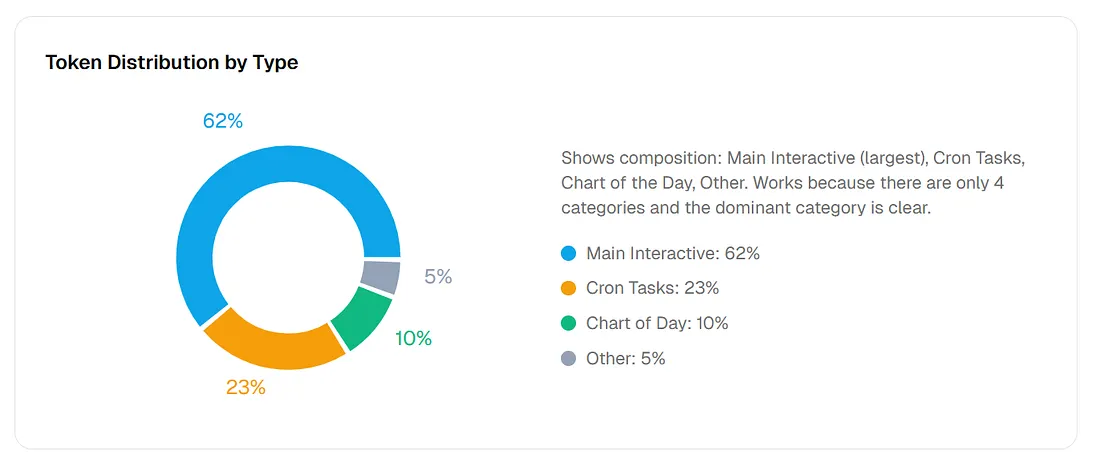
Shows composition: Main Interactive (largest), Cron Tasks, Chart of the Day, Other. It works because there are only four categories and the dominant category reads clearly.
Top Sessions by Token Usage
Ranked by token usage, sorted descending. Horizontal orientation accommodates long session names — it immediately identifies the heavy hitters.
Key Insight
Each visualization answers a question. The dashboard works because questions are sequenced: Overview → Trends → Composition → Details → Insights.
Replicating This for Your OpenClaw Setup
Template and prompts that produced this dashboard:
Data Preparation
# Install usage export skill
openclaw skill add usage-export
# Generate export
openclaw skill run usage-export
# Parse session transcripts for additional metadata
openclaw skill run session-cost --format csv
The ChartGen AI Prompt
Create an OpenClaw Token Analytics Dashboard with:

DATA:
- Upload: usage_export.csv, session_costs.csv

KPI SECTION:
- Total Tokens (with % change vs baseline)
- Daily Average (with peak indicator)
- Active Sessions (main + cron breakdown)
- Cron Efficiency (output % / cost %)

VISUALIZATIONS:
- Daily consumption trend: line chart, 3 series (Total, Main, Cron)
- Token distribution: donut chart by session type
- Top sessions: horizontal bar chart, sorted by tokens
- Hourly pattern: grouped bar, weekday vs weekend
- Session table: sortable, filterable, with efficiency scores

INSIGHTS:
- AI-generated executive summary
- Peak usage identification
- Efficiency gap analysis
- Growth trend projection
- Optimization recommendations

INTERACTIVITY:
- Date range filter
- Session type filter
- Min token threshold filter
- Export CSV button
Customization Ideas
- Add cost calculation (tokens × rate per model)
- Include model breakdown (which LLM consumed most)
- Add error rate tracking
- Implement budget versus actual comparison
- Create alerting thresholds
The Value for OpenClaw Users
Power users gain visibility — not just totals.
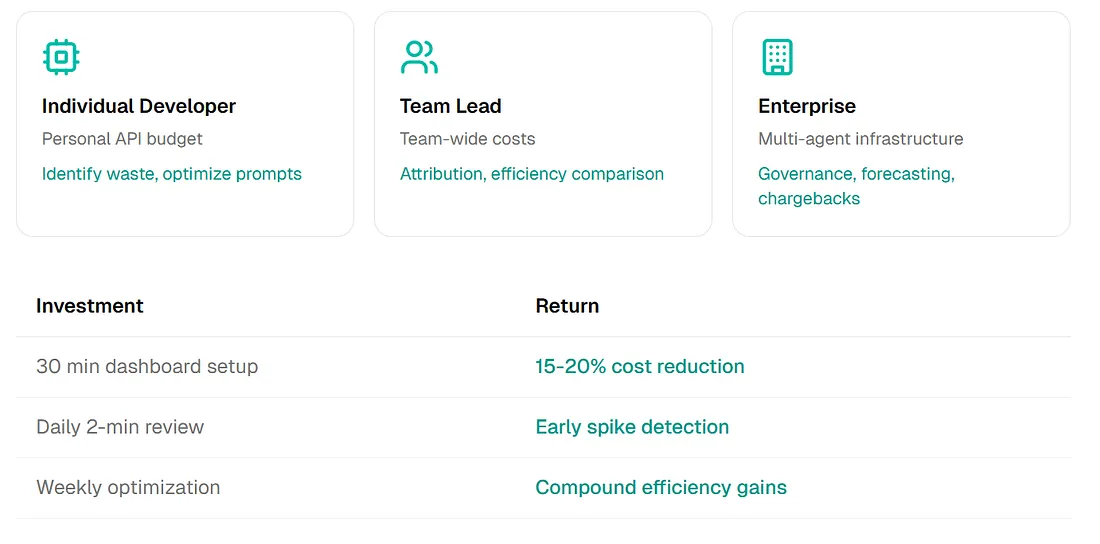
Individual Developer
Personal API budget — identify waste and optimize prompts.
Team Lead
Team-wide costs — attribution and efficiency comparison.
Enterprise
Multi-agent infrastructure — governance, forecasting, chargebacks.
Beyond cost: quality insights. Token analytics is not only about spending less. High token consumption with low output often signals prompt inefficiency, excessive retries, context bloat, or model mismatch (using a flagship model where a smaller one suffices). The efficiency metric surfaces quality issues, not just cost issues.
Frequently Asked Questions
How do I track OpenClaw token usage?
OpenClaw provides basic tracking via /status, /usage full, and openclaw status --usage. For detailed analytics, use skills like usage-export and openclaw-cost-tracker, or build a dashboard with tools like ChartGen AI for visual analysis and insights.
Why are my OpenClaw cron tasks using so many tokens?
Cron tasks often load full context repeatedly without memory optimization between runs. Check efficiency metrics (tokens per event) — cron tasks typically show 50–70% lower efficiency than interactive sessions. Consider consolidating tasks, reducing frequency, or implementing context summarization.
How can I reduce OpenClaw API costs?
Strategies include consolidating redundant cron tasks, weekend scheduling reduction, token limits per session, cheaper models where appropriate, and caching repeated context. Many users can achieve 15–25% reduction through optimization alone.
What metrics should I track for OpenClaw usage?
Essential metrics: total tokens, daily average, tokens by session, tokens by type (main versus cron), efficiency (tokens per output event), growth trend, and peak usage times. Advanced: input/output token split, model breakdown, error retry rate.
Conclusion: Visibility Enables Optimization
OpenClaw is powerful, but power without visibility leads to runaway costs. Built-in tracking answers “how much?” A real dashboard answers “where?”, “why?”, and “what should I change?”
18% token reduction achieved. $90/mo ongoing savings from cutting waste, not output.
The dashboard took about 30 minutes to build with ChartGen AI’s Dashboard Generator. The patterns it revealed continue to pay for themselves every month.
Key Takeaways
- Raw totals from
/statusrarely explain which sessions or crons drive spend. - Cron jobs can look “cheap” while hiding massive efficiency gaps versus interactive runs.
- Exports (
usage-export, session cost CSVs) plus a dashboard workflow turn logs into decisions. - A short ChartGen AI build cycle makes iteration on metrics and layouts realistic for individuals and teams.