


You have seen it in every boardroom: a pie chart with 12 slices, a line chart connecting unrelated categories, a bar chart so cluttered it says nothing. The data was fine. The chart choice was wrong.
Wrong chart types lead to misinterpretation, poor decisions, and wasted meeting time explaining what should be obvious. Bar, line, and pie charts account for 80%+ of business visualizations. Master these three, and you have solved most chart selection problems.
1. The Most Common Data Visualization Mistake
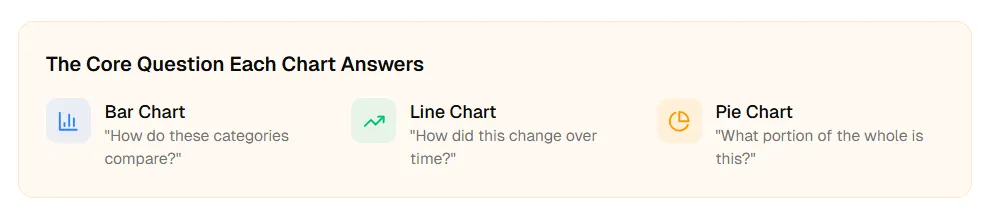
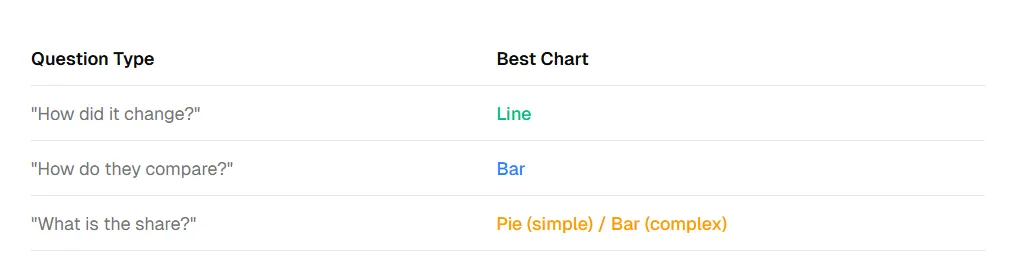
The Core Question Each Chart Answers
Bar Chart: “How do these categories compare?”
Line Chart: “How did this change over time?”
Pie Chart: “What portion of the whole is this?”
2. The 4-Question Decision Framework
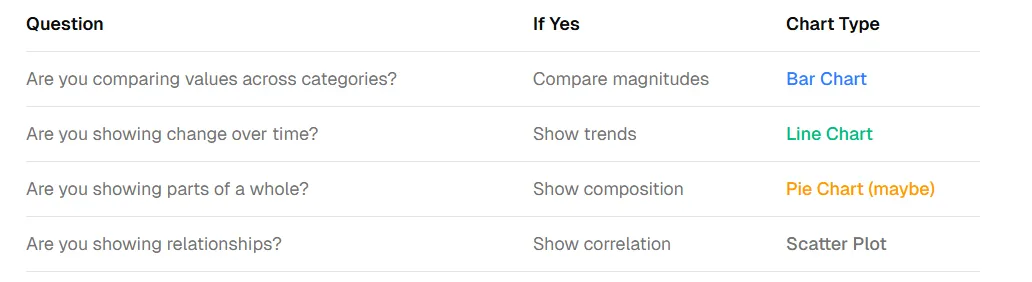
Before choosing a chart type, ask these four questions. Your answers will point you to the right visualization.
The Most Important Question
What decision will someone make after seeing this chart? If the answer is not clear, you might have the wrong chart — or you are visualizing the wrong thing entirely.
3. Bar Charts: The Comparison Workhorse
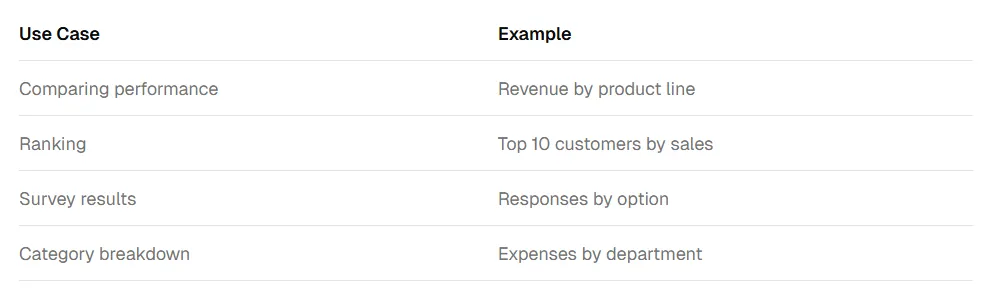
Bar charts excel at comparing values across discrete categories. The length of bars is easy for humans to compare accurately, making them ideal for ranking and magnitude comparisons.
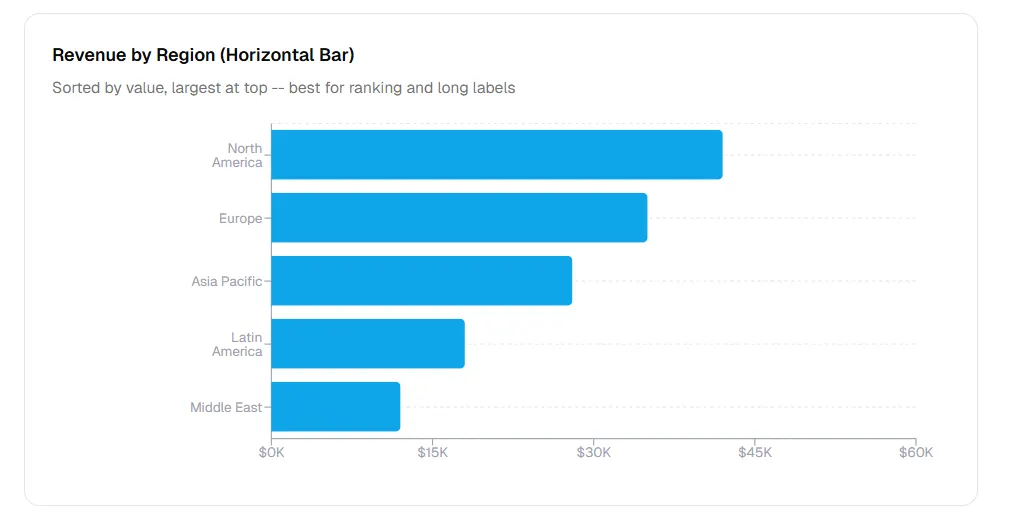
Revenue by Region (Horizontal Bar)
Sorted by value, largest at top — best for ranking and long labels.
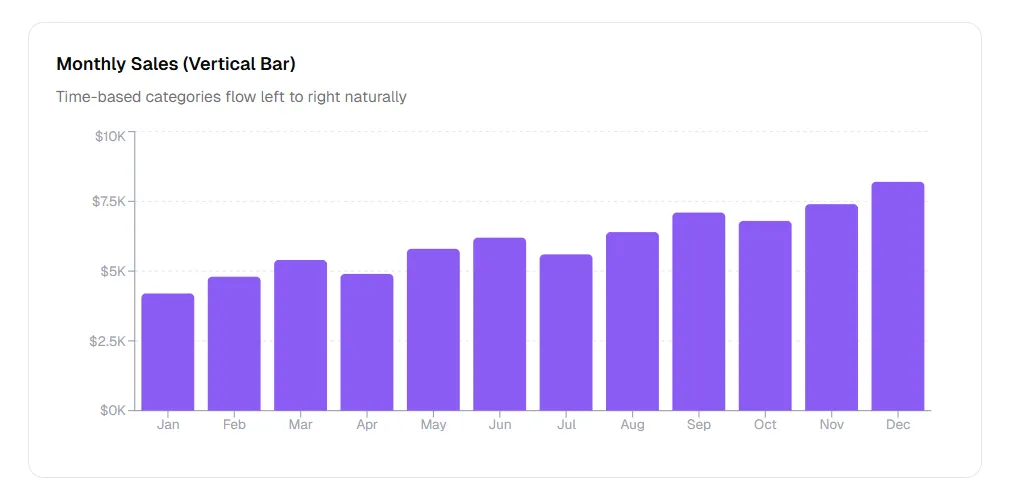
Monthly Sales (Vertical Bar)
Time-based categories flow left to right naturally.
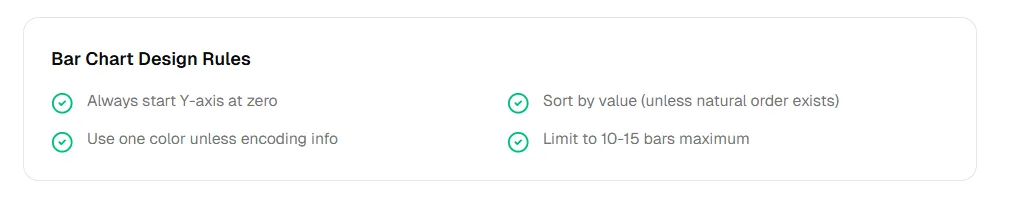
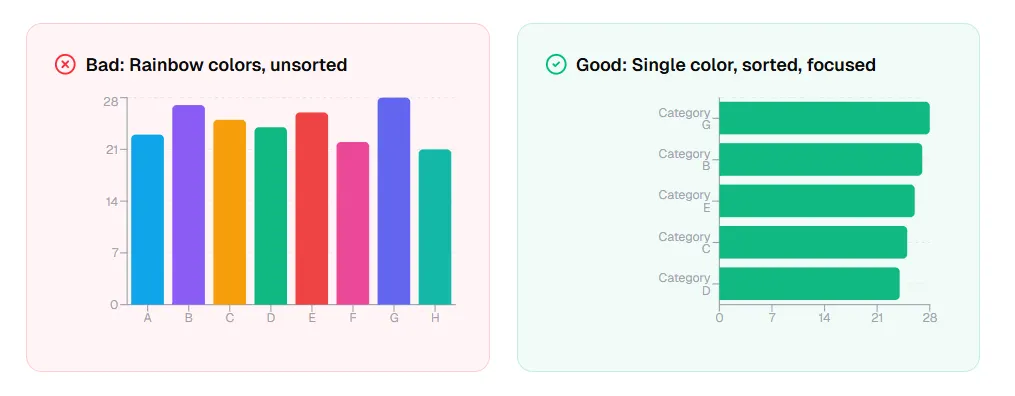
Bar Chart Design Rules
- Always start Y-axis at zero
- Sort by value (unless natural order exists)
- Use one color unless encoding info
- Limit to 10–15 bars maximum
4. Line Charts: The Trend Revealer
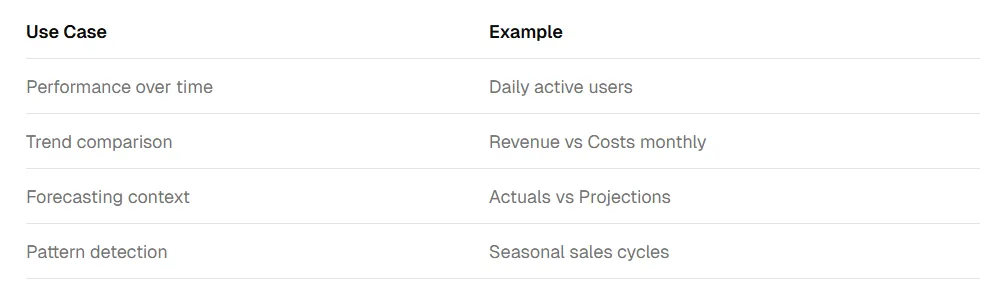
Line charts shine when showing trends and patterns over time. The continuous line emphasizes progression and rate of change, making them ideal for time-series data.
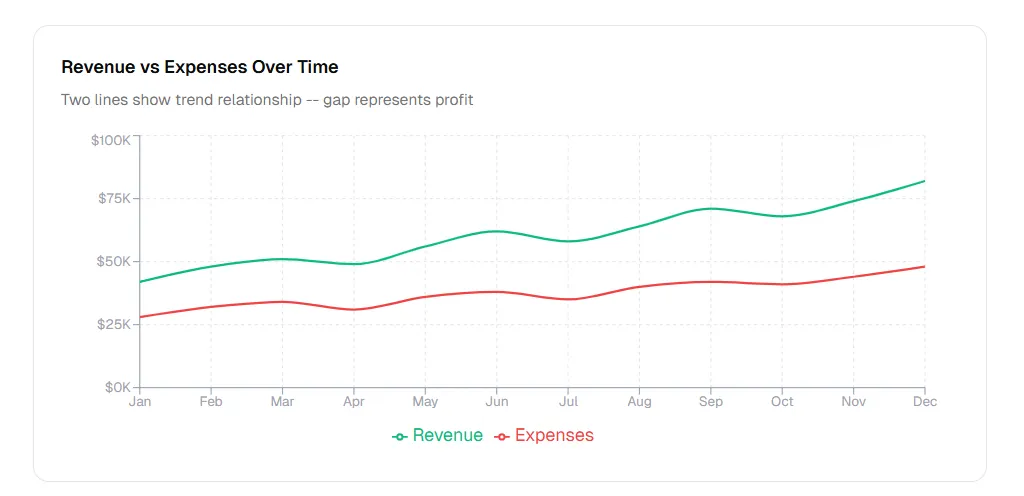
Revenue vs Expenses Over Time
Two lines show trend relationship — gap represents profit.
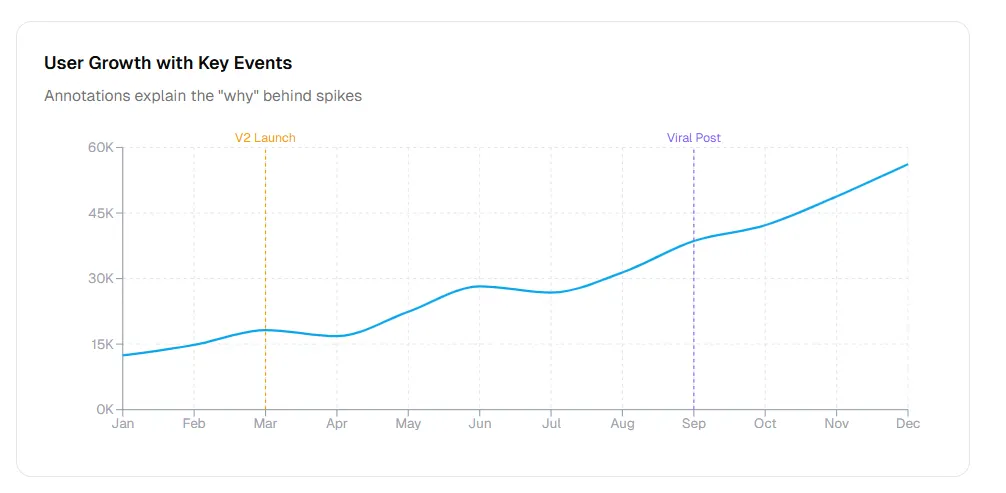
User Growth with Key Events

Annotations explain the “why” behind spikes.
Line Chart Design Rules
- Y-axis can be truncated (unlike bars)
- Limit to 4–5 lines maximum
- Time flows left to right always
- Annotate key events on the chart
5. Pie Charts: The Controversial Choice
Pie charts are the most debated visualization. Data experts often advise against them because humans struggle to compare angles accurately. Yet they remain popular for simple part-to-whole relationships.
The Strict Rules for Pie Charts
- Maximum 5 slices only
- Slices must sum to 100%
- Avoid similar-sized slices
- No 3D, no exploded slices
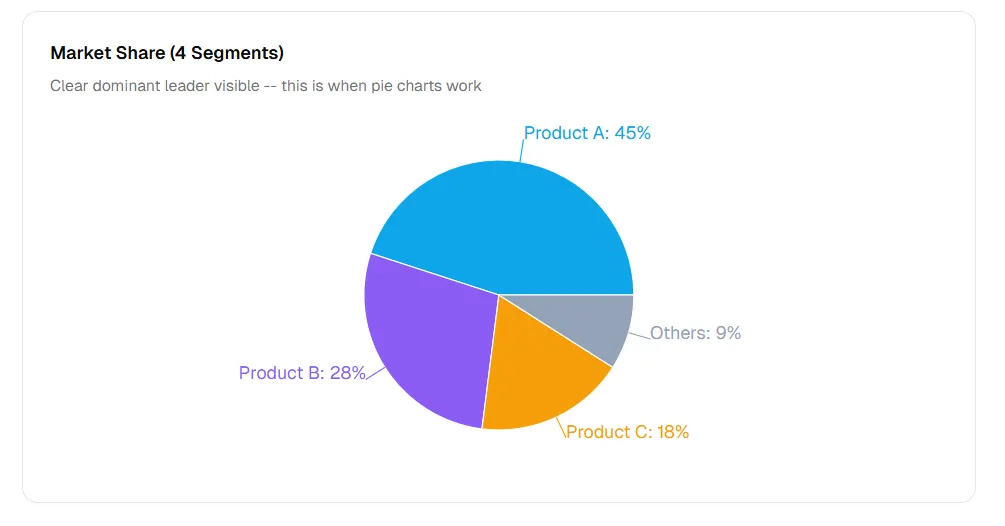
Market Share (4 Segments)
Clear dominant leader visible — this is when pie charts work.
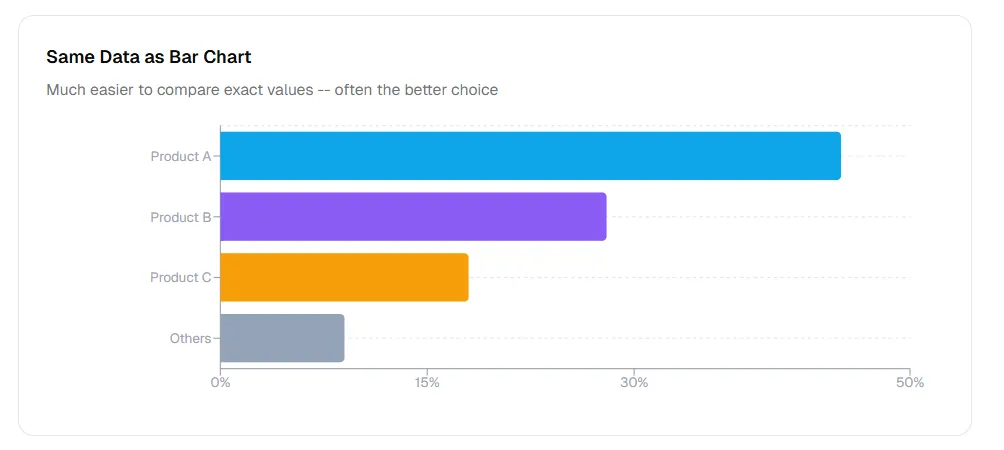
Same Data as Bar Chart
Much easier to compare exact values — often the better choice.
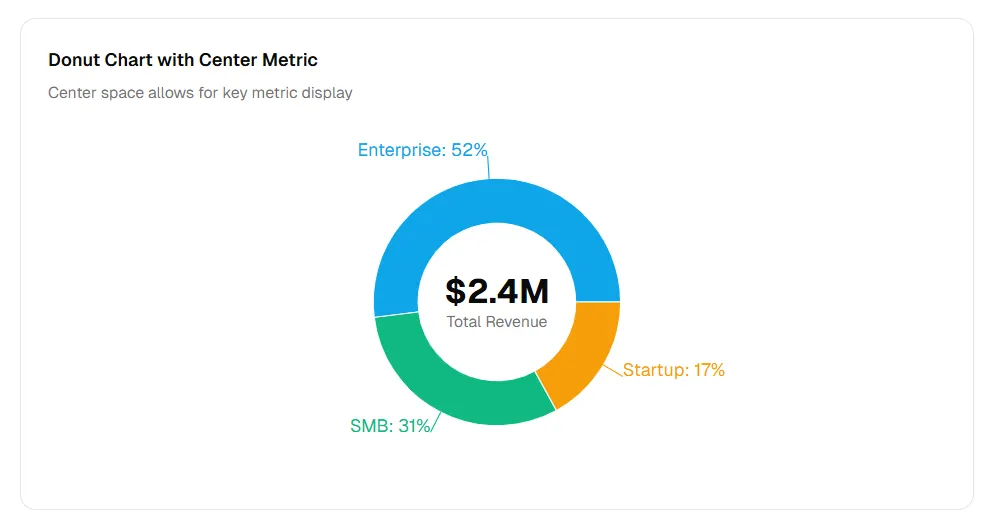
Donut Chart with Center Metric
Center space allows for key metric display.
When to use alternatives
Pie charts work when the story is simple: “One thing dominates” or “Two things split evenly.” For anything more complex, use bars.
6. Same Data, Three Charts: See Why Choice Matters
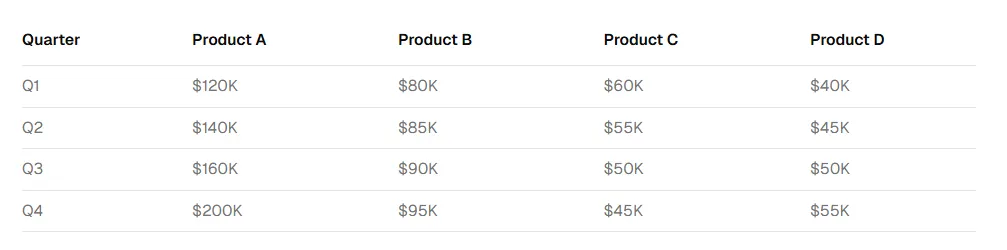
Let us take one dataset and visualize it three ways to see which works best for different questions.
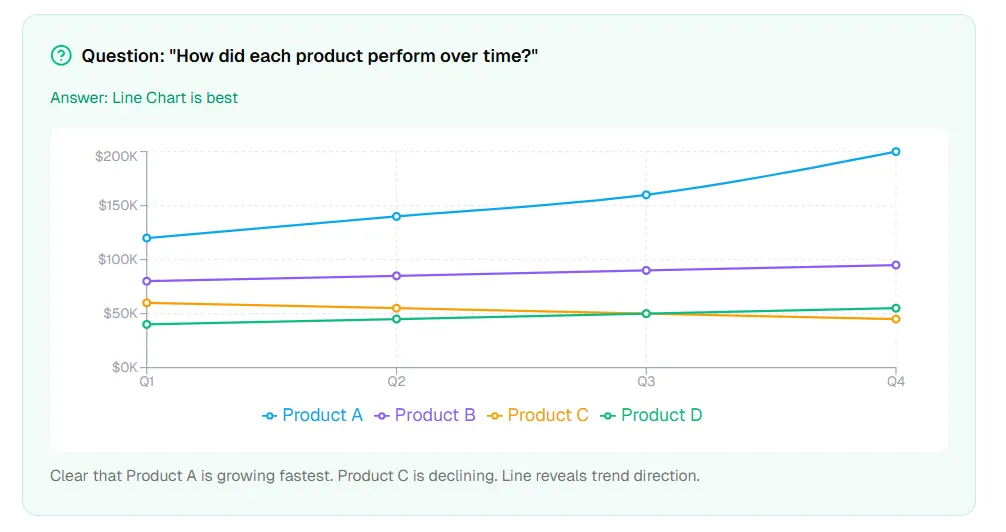
Question: “How did each product perform over time?”
Answer: Line Chart is best
Clear that Product A is growing fastest. Product C is declining. Line reveals trend direction.
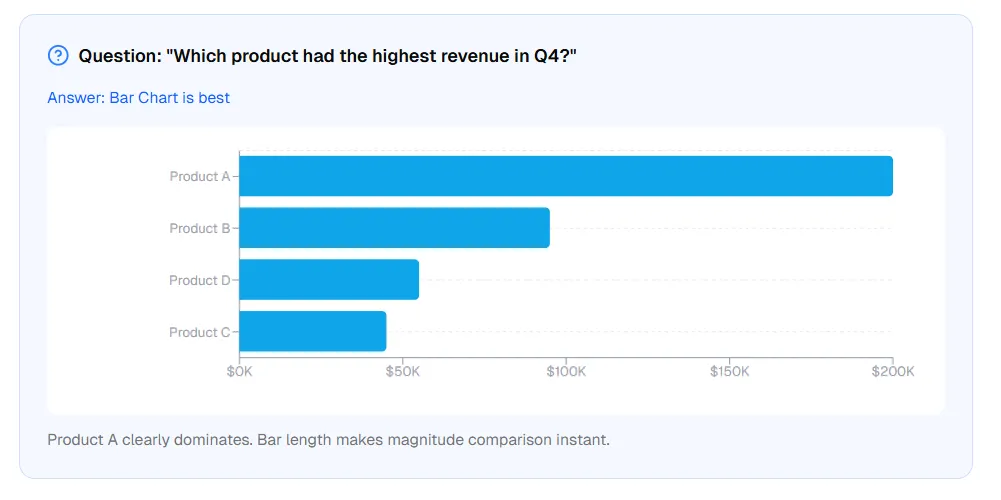
Question: “Which product had the highest revenue in Q4?”
Answer: Bar Chart is best
Product A clearly dominates. Bar length makes magnitude comparison instant.
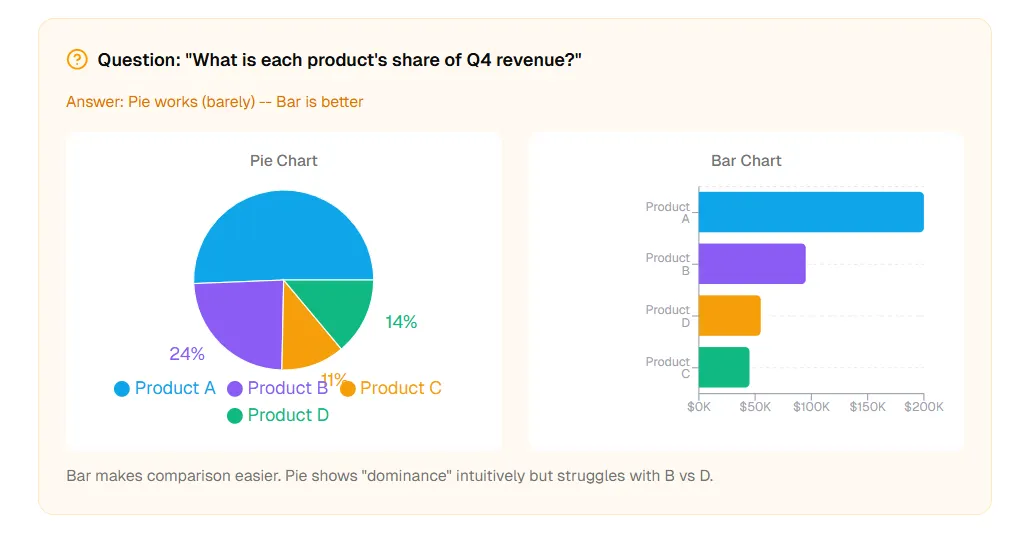
Question: “What is each product’s share of Q4 revenue?”
Answer: Pie works (barely) — Bar is better
Bar makes comparison easier. Pie shows “dominance” intuitively but struggles with B vs D.
7. Common Mistakes and How to Avoid Them
Using Pie Charts for Trends
Mistake: Multiple pie charts to show change over time
Fix: Use line chart or stacked bar chart
Using Line Charts for Categories
Mistake: Connecting unrelated categorical data with lines
Fix: Use bar chart — lines imply continuity that does not exist
Truncating Bar Chart Y-Axis
Mistake: Starting Y-axis at non-zero to exaggerate differences
Fix: Always start bar charts at zero
Too Many Pie Slices
Mistake: Pie chart with 10+ tiny slices
Fix: Group small categories into “Other” or use bar chart
Spaghetti Line Charts
Mistake: 8+ lines tangled together
Fix: Limit to 4–5 lines, or use small multiples, or highlight key lines
8. How AI Chart Tools Handle Selection
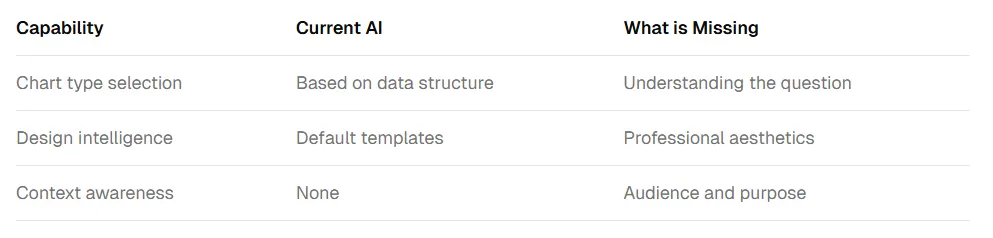
AI tools can generate charts quickly, but choosing the right chart still requires understanding the question you are answering.
The ChartGen AI Approach
At ChartGen AI, we have built the decision framework into the tool:
- Question-first prompts: “What question are you answering?” before “What chart do you want?”
- Smart defaults: Automatically applies the 4-question framework
- Design intelligence: Enforces zero baselines for bars, direct labels for lines
- Alternative suggestions: “Your data has 12 categories. Consider this bar chart instead.”
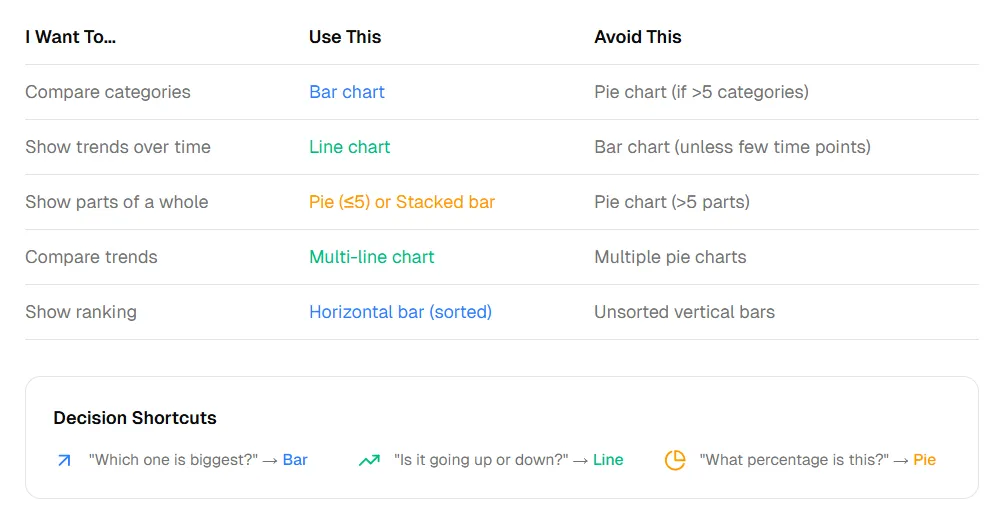
9. Quick Reference: Chart Selection Cheat Sheet
Decision Shortcuts
- “Which one is biggest?” → Bar
- “Is it going up or down?” → Line
- “What percentage is this?” → Pie
10. Frequently Asked Questions
When should I use a bar chart vs a line chart?
Use bar charts to compare values across categories (which product sold most). Use line charts to show change over time (how did sales change month to month). Bar charts emphasize magnitude; line charts emphasize trends.
Why are pie charts considered bad?
Pie charts are not inherently bad, but they are often misused. Human eyes struggle to compare angles accurately, especially with more than 5 slices. For complex composition data, horizontal bar charts are more accurate.
Can I use a line chart for categorical data?
No. Lines imply continuity between points. If your categories have no natural order (like product names or regions), use a bar chart instead. Lines should only connect data with inherent sequence.
Should bar charts always start at zero?
Yes. Unlike line charts, bar chart magnitude is perceived by bar length. Truncating the Y-axis makes small differences look large and misleads viewers about relative values.
Conclusion: Chart Choice Is Communication Choice
Bar, line, and pie charts each answer different questions. Choosing the right one is not about aesthetics — it is about communication. Use the 4-question framework: Are you comparing? Showing trends? Showing composition? What decision should result?
Remember the rules: Bars start at zero. Lines show continuity. Pies need 5 slices or fewer. AI can generate charts instantly, but understanding these principles ensures the generated chart actually communicates.
Try ChartGen AI to turn your decision framework into presentation-ready charts in minutes.