



The future of data analysis combines spatial thinking and AI visualization.
Linear chat feels productive until your analysis gets complex. By the time a thread reaches dozens of messages, your best chart is buried, your context is fragmented, and your momentum is gone.
For data work, this is the core mismatch: analysis is networked, but chat is sequential.
Why Linear Chat Breaks Down Fast

Valuable insights quickly disappear inside long chat threads.
Chat interfaces are excellent for quick writing and single questions. They struggle when the goal is multi-step reasoning across many related findings.
The common failure pattern:
- Important visuals are buried in scroll history
- Related insights are separated by chronology, not meaning
- Context windows force repeated re-explaining
- Exploration becomes one track at a time
- The workspace disappears when the session ends
Even strong models underperform when the interface keeps hiding prior work.
The Better Mental Model: Canvas, Not Thread
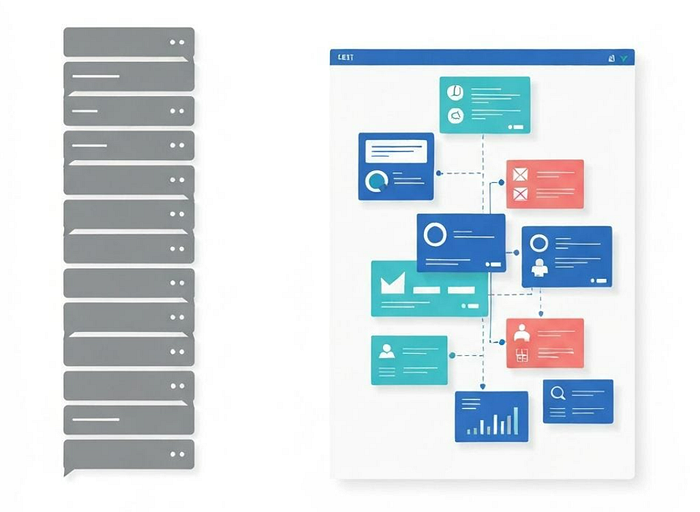
Linear chat versus infinite canvas reveals a major clarity gap.
An infinite canvas turns analysis into a persistent thinking space:
- Items stay visible instead of being pushed upward by new replies
- Position encodes meaning, so related work can be grouped naturally
- Multiple tracks can run in parallel without losing continuity
- Insight quality compounds because previous outputs remain usable
This mirrors how analysts already work on whiteboards: connect, cluster, and iterate spatially.
What an Infinite Data Canvas Looks Like in Practice
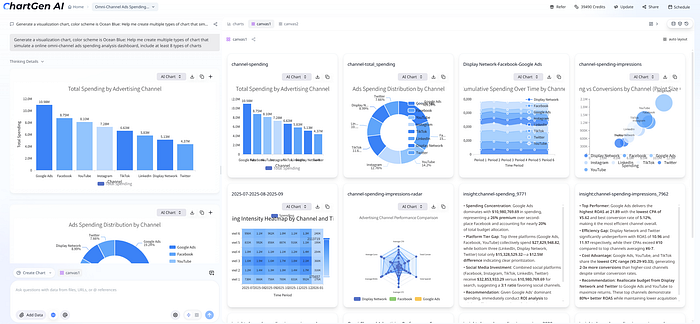
Conversational prompts generate spatial widgets on an infinite canvas.
With ChartGen AI, conversation and canvas work together:
- Left panel: natural-language prompting
- Right panel: persistent canvas output
Typical widgets include:
- Visualization widgets (bar, line, pie, heatmap, scatter, radar)
- Insight widgets (AI-written interpretation cards)
- Table widgets (sortable raw data context)
The key interaction is @mention editing. Instead of rebuilding from scratch, you can reference a widget and request a targeted change in place.
Same Data, Different Interface, Different Outcome
In linear chat:
- You request one artifact at a time
- Old artifacts move out of view
- Follow-up reasoning loses continuity
In infinite canvas:
- Multiple aligned outputs appear together
- Existing artifacts remain visible
- Follow-up questions extend the same analytical system
The AI capability may be identical, but the interface determines how much insight survives long enough to inform decisions.
Your Brain Is Already Spatial

Humans naturally reason about complexity with spatial organization.
Most "aha" moments in analytics come from seeing patterns across multiple views, not from reading one answer at a time. Spatial layouts support this naturally because relationships are visible at a glance.
That is why canvas workflows improve both speed and confidence: they reduce rework while preserving context.
Choosing the Right Interface for the Job

Moving from chronological chaos to spatial clarity improves analytical flow.
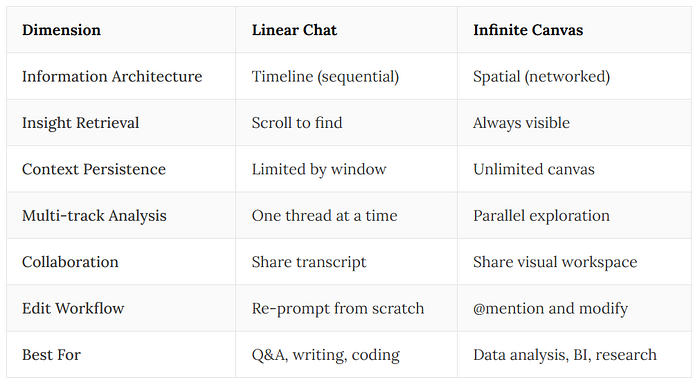
Linear chat versus infinite canvas across workflow dimensions.
Use linear chat when you need:
- Quick one-off answers
- Draft text generation
- Narrow debugging loops
Use infinite canvas when you need:
- Multi-dimensional data analysis
- Persistent investigation workspaces
- Insight synthesis across many artifacts
- Collaborative analytical context
How to Start
- Upload CSV, Excel, or connect a data source
- Ask for the business question, not the chart type
- Let charts, tables, and insights generate together
- Use
@mentionto deepen specific findings - Rearrange the canvas into decision-ready clusters
A practical first step is migrating one recurring monthly report into a persistent canvas so each cycle builds on the last.
Final Thoughts
Linear chat is not wrong. It is just the wrong default for complex analysis.
If your team spends time re-finding insights instead of extending them, the interface is likely the bottleneck.
The shift to infinite canvas is less about prettier charts and more about preserving analytical thinking.
Key Takeaways
- Data analysis is networked work, while chat threads are sequential containers
- Infinite canvas keeps charts, insights, and tables visible in one persistent space
- Spatial workflows reduce context loss and support better follow-up reasoning
- The same AI model produces stronger outcomes when the interface fits the task