


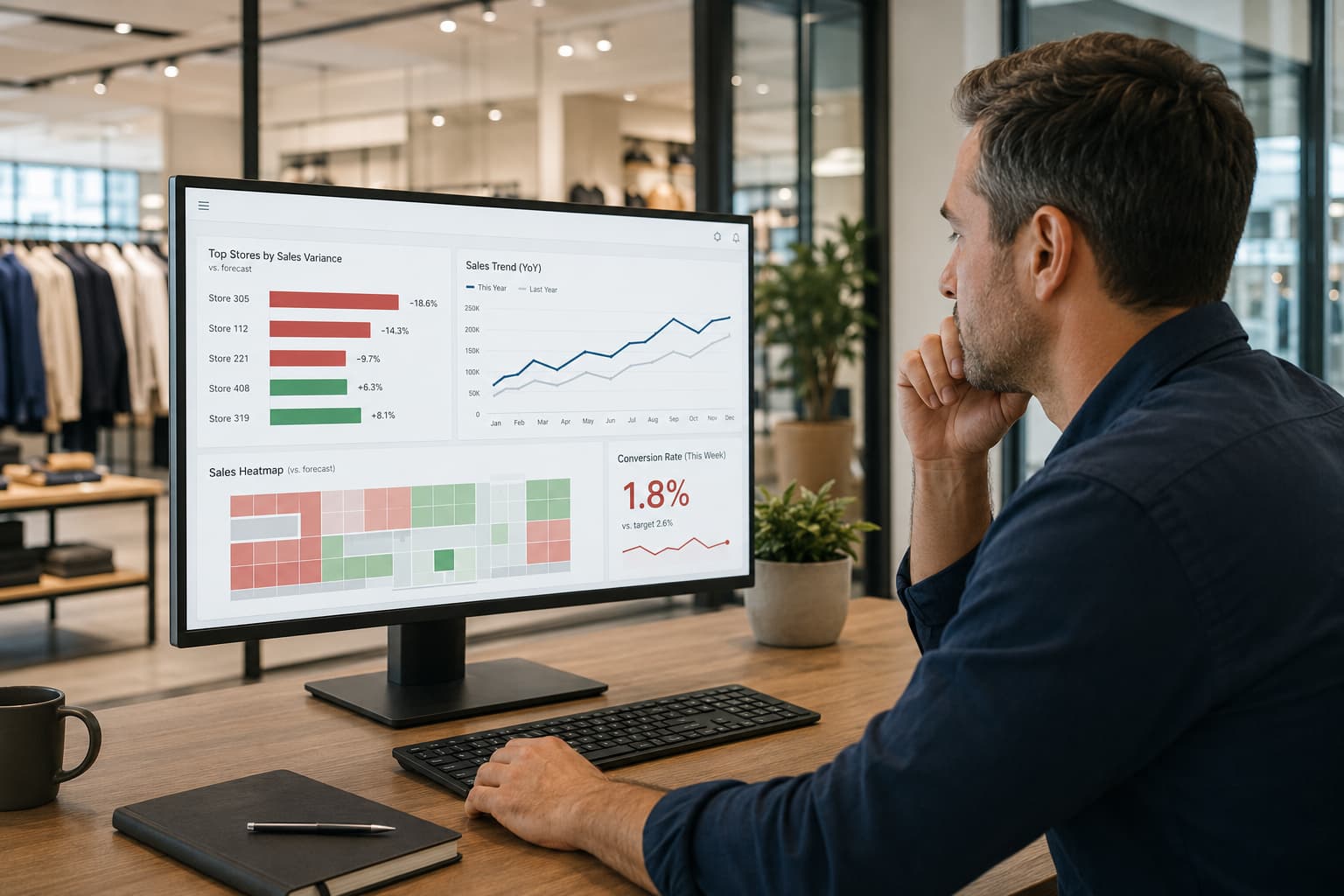
Most retail teams have a dashboard. Most retail teams also have a Monday morning meeting where someone opens a spreadsheet instead.
The dashboard exists. It just doesn't get used.
Dashboards get built, then abandoned. Not because the data is wrong. Because the dashboard was designed to display information rather than surface the three things that actually need attention this week.
This guide is about the difference between those two things — and how to build a retail analytics dashboard that managers actually open.
The Problem With Most Retail Dashboards
The typical retail analytics dashboard is built by someone who wants to be thorough. It has total sales, sales by store, sales by category, sales by day, foot traffic, conversion rate, average transaction value, returns, and twelve more metrics for good measure. Thoroughly on paper. Useless in practice.
Here is why: a dashboard that shows everything forces the user to do the analytical work themselves. They have to scan twenty charts, mentally compare this week to last week, identify which numbers are off, figure out which stores are the problem, and decide what to do. By the time they finish, it is Wednesday.
A store performance dashboard has a different job. It answers one question before anything else: what needs my attention today?
The difference comes down to one principle: build for the decision, not for the presentation. Everything else follows from that.
What Does a Retail Dashboard Actually Need to Do?
Think of a retail analytics dashboard as a weekly exception report, not a complete data summary. Its job is to surface the stores, categories, and time periods that are behaving unexpectedly — and let the manager ignore everything that is performing normally.
This changes which charts matter and how they should be designed.
Surface Exceptions, Not Averages
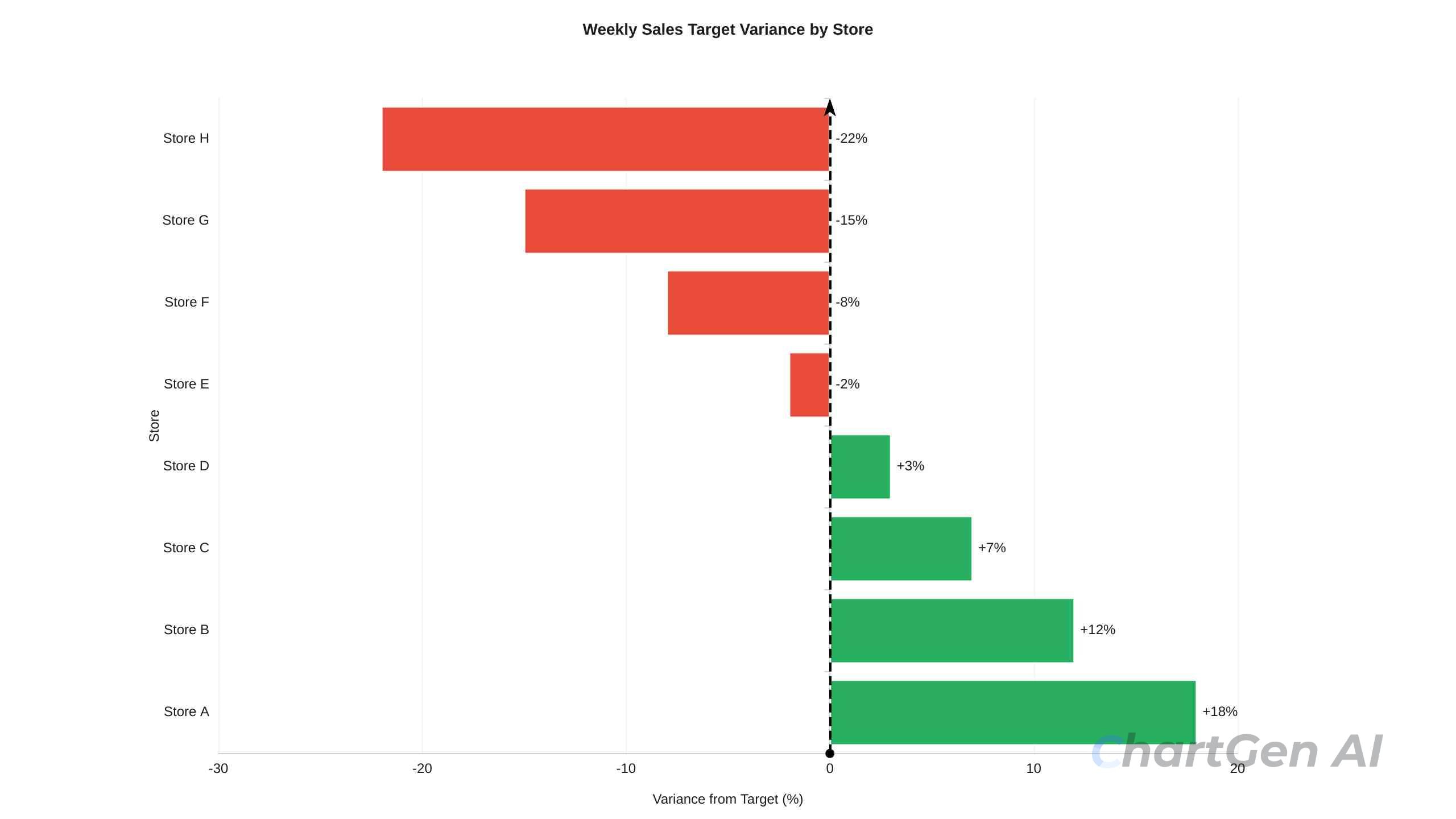
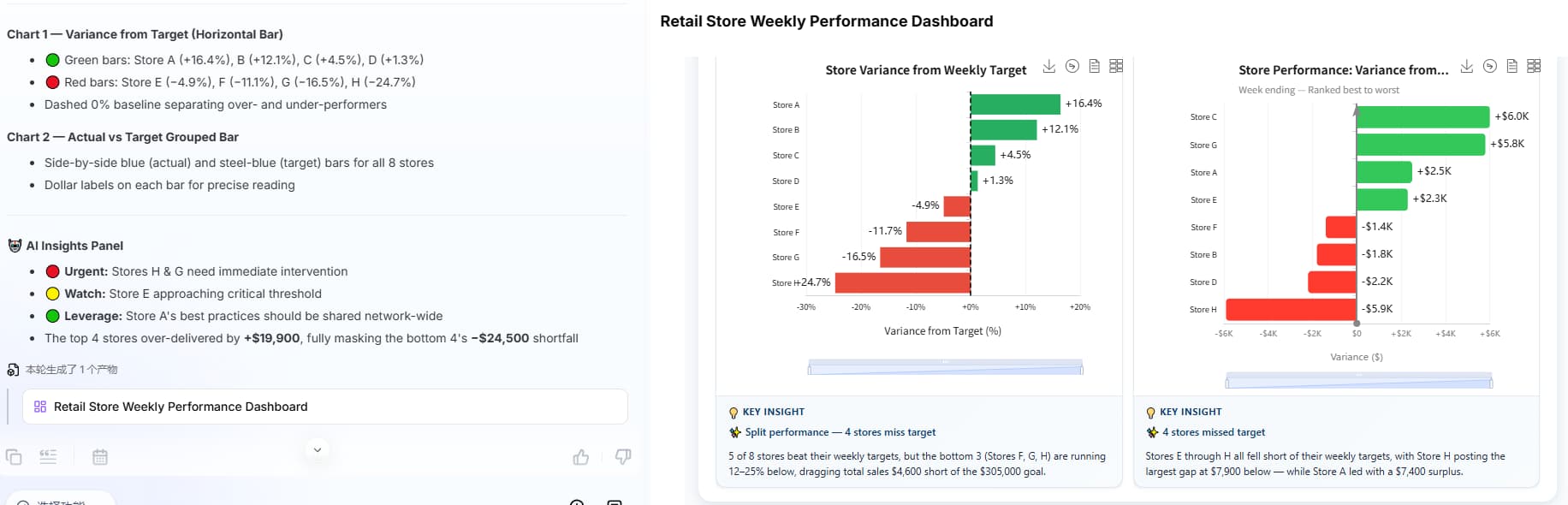
The most useful chart in a store performance dashboard is not the one showing total sales. It is the one showing which stores are furthest from their targets — sorted by variance, not by store name or store number.
A Bar Chart Generator can rank stores by percentage deviation from target in seconds — green bars for above target, red bars for below. The manager does not need to read the numbers. The visual ranking does the work, and the conversations that need to happen this week are obvious before the meeting starts.
The less obvious benefit is what it reveals about adjacent stores. A regional sales comparison across five areas might show two regions with nearly identical total revenue, but when average transaction value is layered in, one region is running 3% lower per transaction across the board. The total looks fine. The unit economics are quietly eroding.
Show the Pattern, Not Just the Period
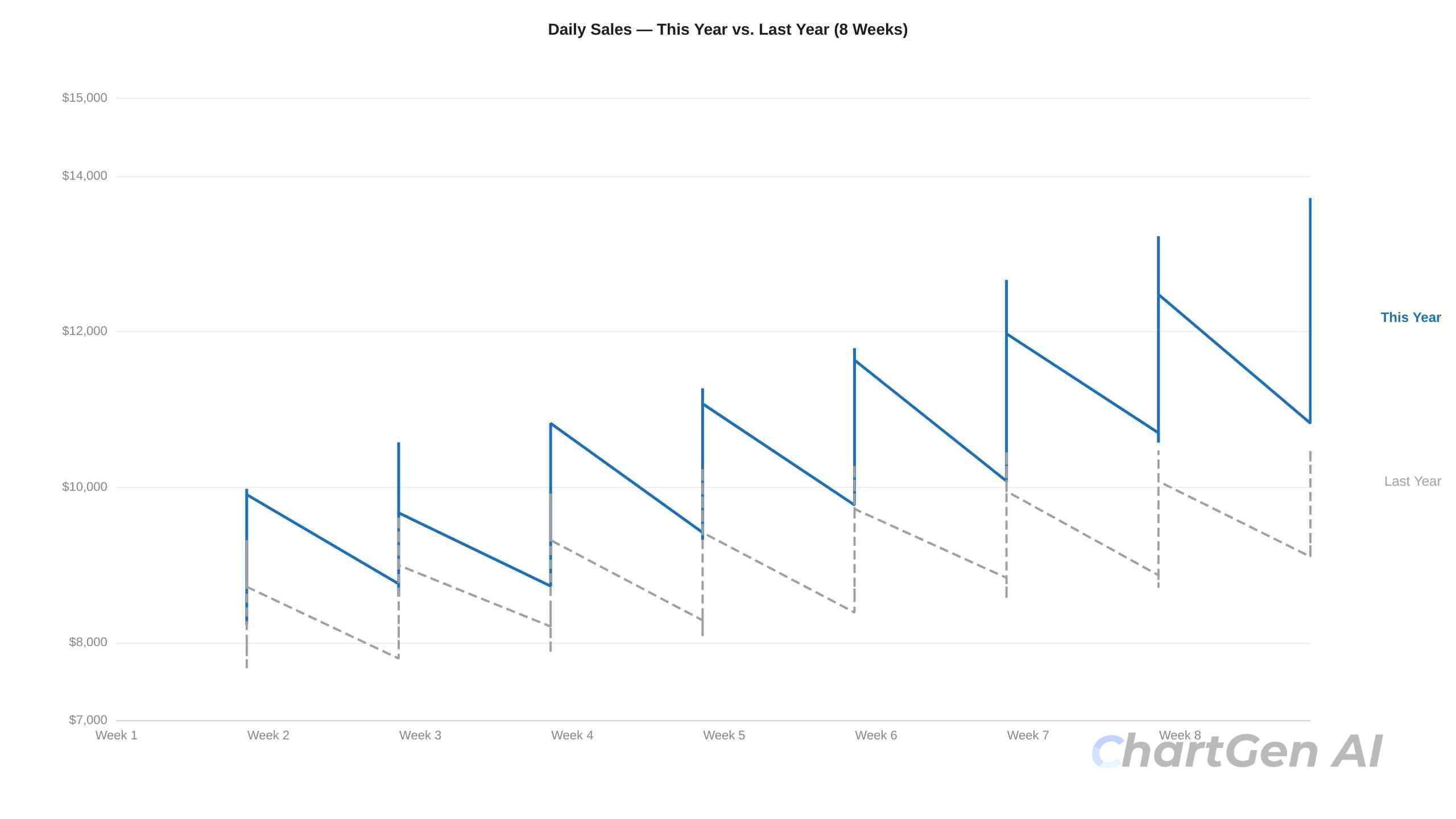
A single week's sales number is almost meaningless without context. A store that did $42,000 last week might be having its best January in three years, or it might be down 18% from the same week last year.
The chart that earns its place in a retail analytics dashboard is a Line Chart Generator that overlays this week's sales against the same week last year — seasonal effects disappear, and real performance becomes visible. Not this month vs. last month. This week vs. the same week last year.
One line is solid. One line is dashed. The gap between them is the story.
Show When, Not Just How Much
Most dashboards show what sold. Almost none show when it is sold, which is often the more actionable insight.
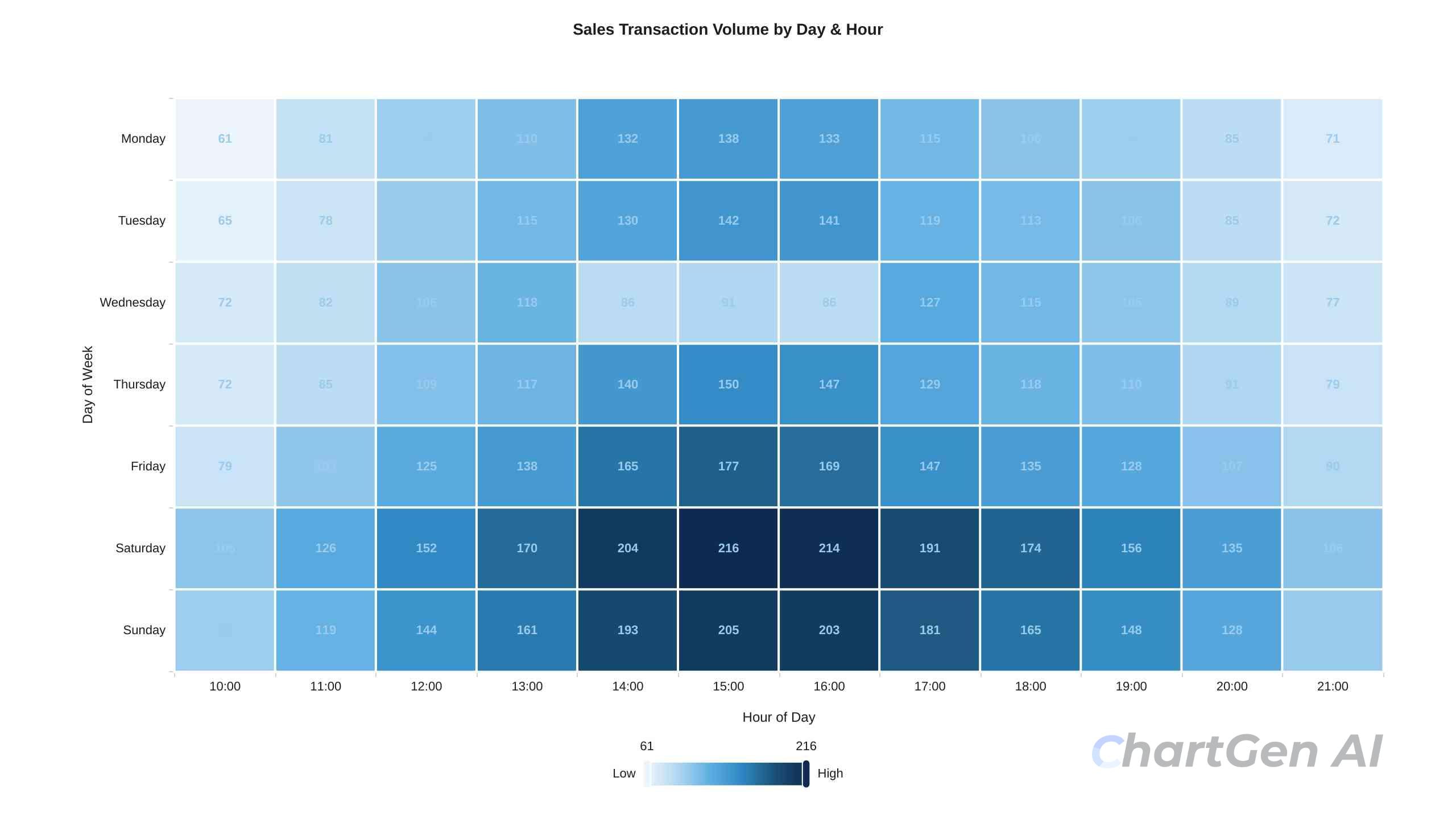
A heatmap with days of the week on one axis and hours of the day on the other turns transaction data into a staffing and promotion decision. The dark cells show peak hours. The light cells show the dead hours that are costing the store in labour costs or missed traffic.
Managers who see this chart for the first time almost always find a surprise. A bakery chain running this analysis discovered that Saturday afternoon was their single highest-traffic window of the week — but they had been calculating stock levels on weekly averages. The result was predictable: the shelves ran dry by 3 pm every Saturday, not because customers stopped buying, but because the summary data never surfaced the signal.
One Number That Matters More Than Sales
Every store performance dashboard should include a conversion rate — the percentage of people who enter the store and make a purchase. It is the metric that separates a traffic problem from a merchandising problem.
If sales are down and foot traffic is also down, the issue is external. If sales are down but foot traffic is flat, the issue is inside the store. Conversion rate makes that distinction visible without any additional analysis.
A simple gauge chart or KPI card showing this week's conversion rate against last year's is enough. The chart does not need to be complex to be useful.
Building This Dashboard in Practice
The four charts above: —the store variance ranking, YoY trend line, sales heatmap, and conversion rate KPI — cover most of what a retail operations manager needs to make weekly decisions.
Building them traditionally meant either hours in Excel or a BI tool license that costs more than most store managers' monthly budgets. ChartGen AI generates all four from a standard POS export in minutes.
Upload the CSV, and describe what you need. ChartGen AI works as a retail sales report generator as well as a dashboard builder — you can generate a single chart or a full multi-chart view from the same prompt interface:
"Horizontal bar chart of stores ranked by percentage variance from their weekly sales target. Red for below target, green for above."
"Daily sales line chart for the past 8 weeks with the equivalent period last year as a dashed overlay."
"Heatmap of transaction volume by day of week and hour of day for the past 30 days."
After generating the charts, ChartGen AI produces a set of AI insights drawn from the data — identifying which stores have been below target for multiple consecutive weeks, which time slots are consistently underperforming, and where YoY gaps are widening. These are not chart descriptions. They are observations that point to specific actions.
David K., a Retail Operations Manager who uses ChartGen AI's regional sales templates, put it this way: "Regional sales templates helped our team identify underperforming stores we hadn't noticed. The AI insights were spot-on."
That is the difference between a dashboard that displays data and one that does analytical work on your behalf.
The One Thing Most Retail Dashboards Get Wrong
They are built to impress, not to decide.
A dashboard with twenty charts, full colour coding, and animated transitions looks thorough. It also takes fifteen minutes to read and leaves the manager with no clearer sense of priority than when they started.
The dashboards that actually get used every week tend to look almost boring — four or five charts, consistent colour logic, a clear visual hierarchy that puts the most important signal at the top. Managers open them because they answer the question quickly, not because they are comprehensive.
The stores that need attention this week should be visible in under thirty seconds. Everything else can wait.
Frequently Asked Questions
What is a retail analytics dashboard?
A retail analytics dashboard is a structured visual display of store performance data designed to surface what needs attention — underperforming stores, unusual patterns, conversion problems — without requiring the manager to find those signals themselves.
What metrics should a store performance dashboard show?
A store performance dashboard should prioritise variance from sales target by store, year-over-year sales comparison, sales by time of day and day of week, and conversion rate. Total sales figures provide useful context, but they are rarely the metric that triggers action.
What is retail business intelligence?
Retail business intelligence is the process of turning store data — sales, traffic, transactions, inventory — into structured analysis that supports operational decisions. It ranges from weekly sales reports to real-time dashboards and automated exception alerts.
Can AI generate a retail sales report automatically?
Yes. A retail sales report generator like ChartGen AI lets you upload a POS export, describe the charts and metrics you need in plain English, and produce a dashboard in minutes. The main time saving is not the chart itself — it is skipping the data preparation and formatting work that normally precedes it.
What is same-store sales growth, and why does it matter?
Same-store sales growth \(also called comparable store sales, or SSS\) measures revenue change at stores that have been open long enough to have a prior year baseline. It is the standard metric for separating genuine retail performance from growth driven by opening new locations.
How do I make a retail heatmap?
Upload your transaction data with date, time, and sales columns to a retail data visualization tool and specify: "Heatmap of transaction volume by day of week and hour of day." Most tools will detect the relevant columns automatically.
Your Monday Morning Dashboard, Built in Minutes
The best retail analytics dashboard you can build this week is not the most comprehensive one. It is the one that tells you which stores need attention before you finish your first coffee on Monday morning.
Store variance from the target. YoY sales trend. Sales heatmap by time. Conversion rate. Four charts. One clear picture. Everything else can wait until Thursday.
Try ChartGen AI — upload your store data, describe what you need, and get a retail performance dashboard with AI insights in seconds. Free up to 50 charts per month.